There’s a version of AI content creation that feels like cheating: paste some generic keywords into a tool, get a robotic 2,000-word article out, hit publish, and repeat. The problem with that version isn’t just ethical it’s impractical. It produces hollow content that might rank for a week but ultimately disappears because real human audiences don’t engage with it. Worse, it builds a portfolio that doesn’t reflect your unique perspective.
But there’s a significantly better version. Using AI for content creators effectively means directing it toward the parts of the process that don’t require your creative judgment research aggregation, first-draft scaffolding, formatting, repurposing, and publishing logistics. This strategic delegation frees you to spend substantially more time on the parts that do require a human touch: the unique angle, the personal insight, the lived experience, and your authentic voice.
In my own publishing schedule, adopting this hybrid approach cut my production time in half while actually increasing my reader engagement. This guide covers the full content pipeline for creators who want to operate at genuine scale without sacrificing quality or their soul.
The Core Pipeline: AI for Content Creators
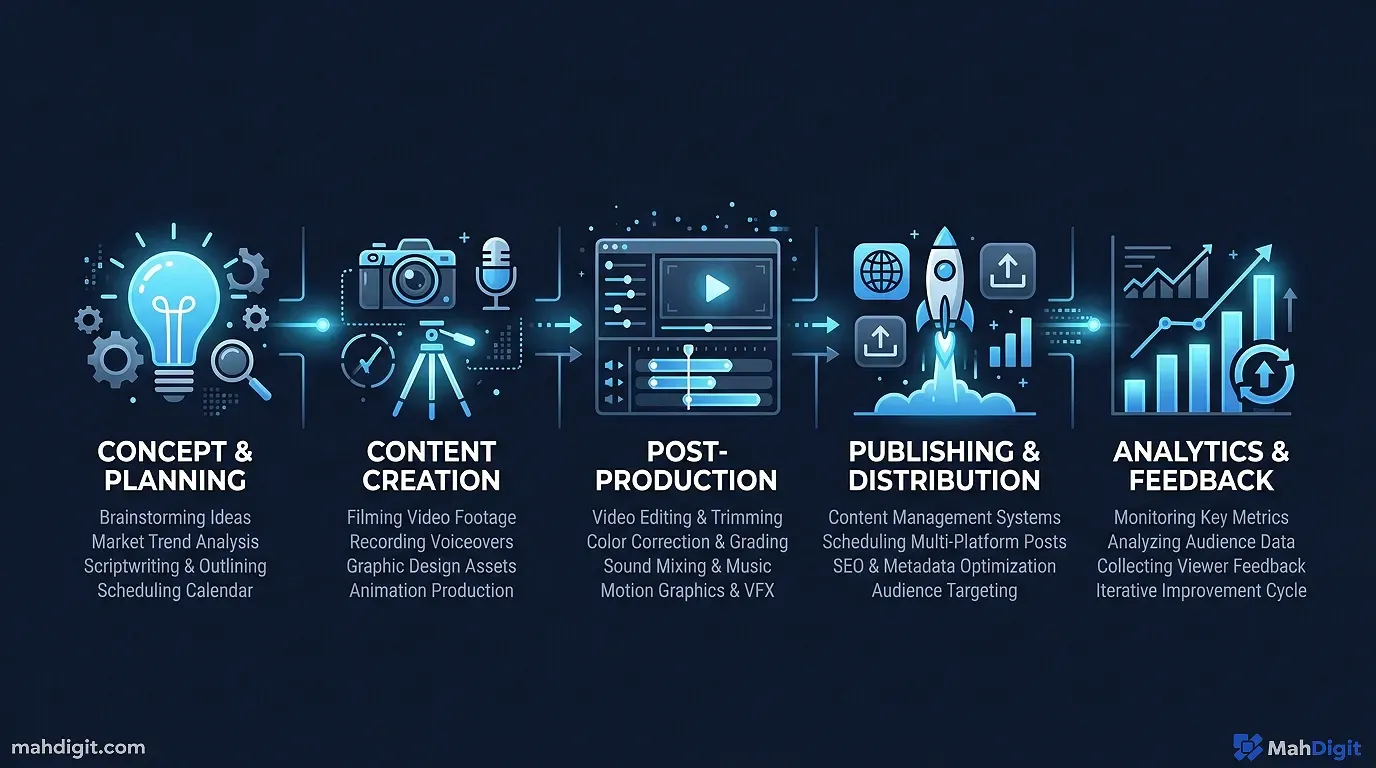
Whether you’re making YouTube videos, writing in-depth blog posts, publishing newsletters, or recording podcasts, your production cycle generally follows the same fundamental stages:
Idea Research Outline Draft Edit Publish Distribute
AI tools can assist at every single stage of this funnel. The secret to maintaining high quality is knowing which tool helps at which stage and where your personal human input is irreplaceable.
Stage 1: Ideation Finding the Angle That’s Worth Writing
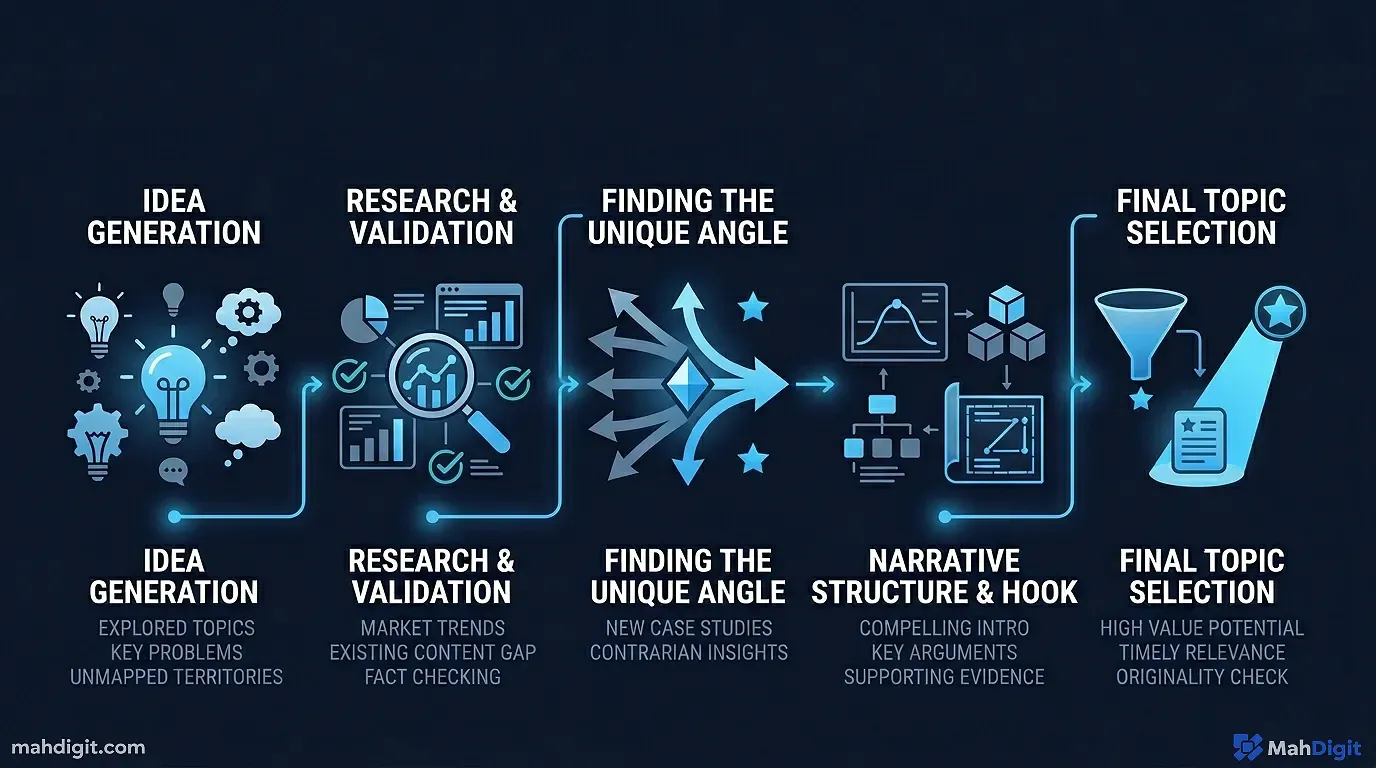
AI is incredibly useful during ideation, but it cannot replace your unique perspective. What it does exceptionally well is help you explore a topic laterally, identifying angles and audience segments you haven’t considered yet.
Topic Expansion and Brainstorming
Instead of asking an AI to “give me blog post ideas,” start with your rough, messy concept. I frequently use Claude 3.5 Sonnet or ChatGPT for this. Ask:
I want to write about [topic]. Help me:
1. Identify 8 different specific angles on this topic (each should feel meaningfully distinct)
2. For each angle, tell me who the target audience would be
3. Flag which 2-3 angles are the most contrarian or least written about online
This surfaces angles you haven’t considered without forcing you to do hours of original competitive research. Because the AI has been exposed to large amounts of existing internet content, it can quickly map the standard landscape around a topic and point you toward the empty spaces. Last month, I wanted to write a generic post about “time management,” but this prompt guided me to write specifically about “time management for solo founders who hate calendars”a much more successful piece.
Search Intent Analysis
For written content specifically, understanding what real people are actually searching for matters immensely. I use Perplexity AI as my intent research assistant. I ask: “What are the most common tactical questions people search for around [topic]?” Perplexity returns synthesized search-intent information complete with clickable source links.
Review those questions, pick the angle that matches what your audience actively needs, and adjust it based on the unique value only you can add.
Stage 2: Research Aggregating the Raw Material
For most serious content topics, there’s existing information you need to incorporate: latest statistics, expert positions, competing views, or historical examples. Manually gathering this through Google searches is incredibly time-consuming. AI makes it significantly faster.
The Live Research Sprint
I use Perplexity specifically for live, sourced research because standard language models often hallucinate facts. I use this prompt: “Summarize the current state of [topic], including 3 key industry statistics from the last year, recent technological developments, and differing expert perspectives.”
Crucially, I always verify any statistics I plan to use by clicking through to Perplexity’s primary source citations. I once caught an AI claiming a software company had 50 million users when the real number was 5 million. Always check the primary source.
For more strategic depth, I paste the generated research summary into Claude and ask it to identify my blind spots: “Based on this research summary, what important, counter-intuitive perspectives or data points are missing that I should look into before writing?”
This dual-tool combination handles 80% of my heavy research phase in about 20 minutes, giving me a large head start.
Your Own Experience The Non-Negotiable Element
This is the part AI simply cannot supply, and it’s the only reason your content is worth reading. For every piece of content I produce, I force myself to explicitly outline:
- A specific, real-world example from my own work or client experience that illustrates the main point.
- A painful mistake I made (or watched a colleague make) that readers can directly learn from.
- A strong opinion or take that I actually hold, even if it’s slightly controversial in my industry.
These human elements are what create content that feels lived-in. They signal to the reader (and to Google’s search algorithms) that this came from a human with genuine expertise.
Stage 3: Outlining Building the Structural Scaffold
A strong outline is the difference between a focused, high-retention video or post and one that wanders aimlessly. AI is genuinely good at generating structural outlinesand equally skilled at generating terrible, generic ones. The key is giving it enough specific direction to produce something worth building upon.
The Strategic Outline Prompt
You are an expert content strategist. Create a detailed structural outline for a [word count]-word [content type] about [topic].

Reader profile: [describe your audience in detail their job, the exact pain point they're trying to solve]
My unique angle/thesis: [what I want to argue, demonstrate, or prove]
Primary keyword: [exact keyword to optimize for]

Requirements:
- Include H2 headings for each major section
- Add 2-3 bullet points under each heading noting what evidence or story should be included
- Suggest a strong opening hook (focus on a relatable problem, no rhetorical questions)
- Suggest a logical closing and specific Call to Action (CTA)

Avoid: standard listicle formats, fluffy generic advice, and content that strays from my core thesis.
The output gives me a working scaffold, not a final structure. I modify these AI-generated outlines about 40% of the timereorganizing sections to build better tension, combining redundant areas, or splitting complex technical points. The large value here is the momentum: I am editing an existing structure rather than staring at a blank page.
Stage 4: Drafting Generating the First Hybrid Pass
This is where the temptation to over-rely on AI is strongest, and where the quality gap between premium creators and content mills becomes obvious.
The Hybrid Drafting Approach
I always write the highest-value parts myself, entirely from scratch:
- The opening 150 words (my human hook and personal connection to the topic)
- Any first-person case studies, stories, or anecdotes
- The core argumentative paragraphs conveying my main opinion
I then use AI to draft the standard explanatory and supportive sectionsthe “here is the historical context” or “here are the software installation steps” parts that don’t require my unique perspective or voice.
My prompt for section drafting:
I'm writing an article titled [title]. The angle is [my angle].

Here is my robust outline for the [section name] section:
[paste section outline]

Write this specific section as a draft.
Tone: Conversational, direct, professional but punchy.
Length: Roughly [word count target].
Important: Start directly with the substance no "In this section we will explore..." transitions. Use concrete, literal examples rather than abstract metaphors.
I treat the resulting output like text provided by a junior staff writer; I review it, cut the fluff, and adjust the syntax to make it sound like me.
The Final Voice Test
After the AI drafts a section and I edit it, I read the text out loud. Anything that trips up my tongue when reading aloud is probably too formal, too smooth, or too generic. I rough it up. I add the conversational hedges I actually use in real life (“To be honest,” “Here’s the catch,”). If I would break a rule of grammar in casual speech to emphasize a point, I break it in the text.
Stage 5: Editing The Polish Phase
Editing AI-assisted drafts is a different skill from editing fully self-written drafts. AI text tends to be grammatically flawless but stylistically boring. My AI drafts consistently need four specific interventions:
- Voice Injection: Adding my specific idioms, my dry humor, and my personal rhythm.
- Anecdote Insertion: Pinning abstract AI concepts to the ground with a real, messy human example.
- Pacing and Simplification: AI loves dense paragraphs and well matched sentence lengths. I intentionally break this up. I’ll drop in a punchy three-word sentence. Right in the middle of a complex thought. It makes the text significantly more scannable.
- Cutting Redundancy: AI often repeats the exact same concept using three slightly different verbs in a single paragraph. I cut the duplicates.
For basic grammar and clarity, I run the final text through an editing tool. For voice, tone, and pacing, the read-aloud pass is the main filter.
Stage 6: Publishing Automating the Logistics
Publishing logisticswriting meta descriptions, tagging, finding linksare genuinely boring and well suited for automation.
SEO Metadata Generation
I generate meta titles and descriptions using this prompt at the end of my workflow:
Based on the full article draft above, write 4 variations of an SEO meta title ( under 60 characters) and a meta description ( under 155 characters).
Primary target keyword: [keyword].
Tone: straightforward, specific, benefit-driven, and utterly devoid of clickbait.
I pick the strongest version, tweak a word or two, and I’m done in 60 seconds.
Categories and Internal Linking Structure
To keep readers on my site, I ask the AI to map out my internal links:
I am publishing this post: [title + brief description].
My existing blog covers topics like: [list core topics or paste recent titles].
Suggest 4-5 internal linking opportunities where I can naturally link my new post to my older posts, including specific anchor text suggestions.
The AI’s internal linking suggestions won’t always be perfect, but they serve as a powerful checklist that prevents me from publishing orphaned content and helps boost my site’s overall SEO structure. For instance, once you have your content published, you’ll likely receive a wave of feedback and questions via email that’s where our AI Email Writing Guide becomes your next essential workflow.
Stage 7: Distribution Repurposing at Scale
After hitting publish, the vast majority of creators leave significant audience value on the table by failing to repurpose their work. A dense 1,500-word blog post contains more than enough raw material for a week of social posts, a dedicated email newsletter section, a short-form video script for YouTube Shorts, and a compelling thread for X (Twitter).
Treating your published content as a primary database for other formats is the highest-ROI habit most creators skip. The AI acts as your dedicated translation engine between formats.
My standard repurposing prompt:
I just published this flagship article: [paste full article or key sections]

Acting as an expert social media manager, extract the core value from this piece and create:
1. Three distinct LinkedIn posts (focus on different actionable takeaways from the article)
2. One email newsletter intro (150 words maximum, designed to drive clicks to the full post)
3. Five punchy Twitter/X posts (standalone tips, under 280 characters each)
4. A engaging short-form video script hook (first 10 seconds only, designed to stop the scroll and introduce the main problem)
Common Mistakes Creators Make with AI Workflows
Publishing AI content that lacks a human perspective. Your audience follows you for your specific take, not for a competent, flavorless summary of conventional wisdom. The AI draft is merely the flour; your personal perspective is the baked bread.
Skipping primary research and relying entirely on AI knowledge. LLM training data has fixed cutoffs, and models frequently state outdated or incorrect information with absolute, challenging confidence. For anything factual, numerical, or historical that you plan to publish, verify it with a live source like Perplexity or direct Google searches.
Failing to personalize the voice. AI defaults to a smooth, formal, structurally conventional corporate style. Your real voice is probably rougher, more specific, and infinitely more opinionated. If your post reads like a B2B SaaS corporate blog, it needs a human rewrite pass.
Treating AI as a magic solution for consistency. AI workflows make producing individual pieces fasterthey do not make your publishing schedule consistent. You still need a content calendar, a topic strategy, and the raw human discipline to actually sit down and create. Those remain uniquely human problems.
Key Takeaways
The most successful implementation of AI for content creators uses the technology for the mechanical and structural heavy lifting, while fiercely protecting human input in the places that actually matter to the audience: the original angle, the lived experience, the authentic voice, and the factual integrity.
- Delegate the framework: Use AI for generating outlines, drafting explanatory sections, optimizing SEO metadata, formatting repurposing, and aggregating broad research.
- Protect the core: Keep human control over the opening hook, the examples drawn from real experience, the contrarian opinions, and fact verification.
- Enforce the voice test: Read every AI-assisted draft aloud. Anything that sounds robotic, overly formal, or clunky needs immediate rewriting.
- Maximize the ROI: Repurposing your flagship content into social formats is the highest-return activity most creators skip; let AI handle the formatting translation.
- Prioritize quality over pure speed: A well-crafted, uniquely human AI-assisted post will beat ten pure-AI articles in search rankings and audience trust every single time.
Frequently Asked Questions
Does using AI for content creation hurt my SEO? Not if you do it properly. Google’s Helpful Content guidelines penalize thin, low-effort content not AI assistance. Posts that contain real personal experience, original analysis, and verified facts perform well regardless of whether AI helped with the drafting. The danger is publishing pure AI output without any human layer on top.
Which AI tool is best for content creators specifically? It depends on the stage. I use Perplexity for live research (it cites sources), Claude 3.5 Sonnet for drafting and editing (exceptional at tone), and Gemini for quick repurposing and social formatting. There’s no single best tool mixing them based on the task consistently outperforms using any one model exclusively.
How do I maintain my authentic voice when AI writes part of the draft? The read-aloud test is the most reliable filter I know. Read every AI-assisted paragraph out loud. If you trip over a phrase or it doesn’t sound like something you’d say in a meeting, rewrite it. Also: write your opening hook and all personal examples yourself, from scratch. The AI’s job is the scaffolding; your voice is the interior.
What’s Next
- For a deep dive into platform-specific social media repurposing strategies, see How to Automate Social Media Posts with AI.
- New to working with AI tools? Getting Started with ChatGPT covers the core prompting principles that make every stage of this content pipeline more effective.
- Ready to tackle your inbox? Read our AI Email Writing Guide to save hours on communication.
