When you’re running a boutique agency, a local shop, or a solo consultancy, every single hour counts twice. You’re not just doing the core work; you’re also managing people, handling complex admin, talking to frustrated customers, and hopelessly trying to find time to actually grow your revenue.
I’ve spoken with dozens of founders about their technology adoption over the last year. When the topic of AI for small business comes up, the pattern I see most often is predictable: they dabble with ChatGPT for ten minutes, get a result that’s either too generic or takes too long to refine, and quietly go back to doing things the old, exhausting way. I did the same thing when ChatGPT first launched. I tried to make it write my entire marketing strategy, got garbage output, and abandoned it for a month.
That failure is almost always a prompting problem, not a technology problem. With the right targeted approach, adopting AI for small business genuinely does save hours not in abstract theory, but in practice, on specific administrative tasks you are already doing every single week.
Here are 7 genuine quick wins, ordered by how fast you’ll see concrete results. No technical skills, no expensive enterprise subscriptions, and no large workflow overhauls required.
Win 1: Customer Email Replies Draft in 30 Seconds
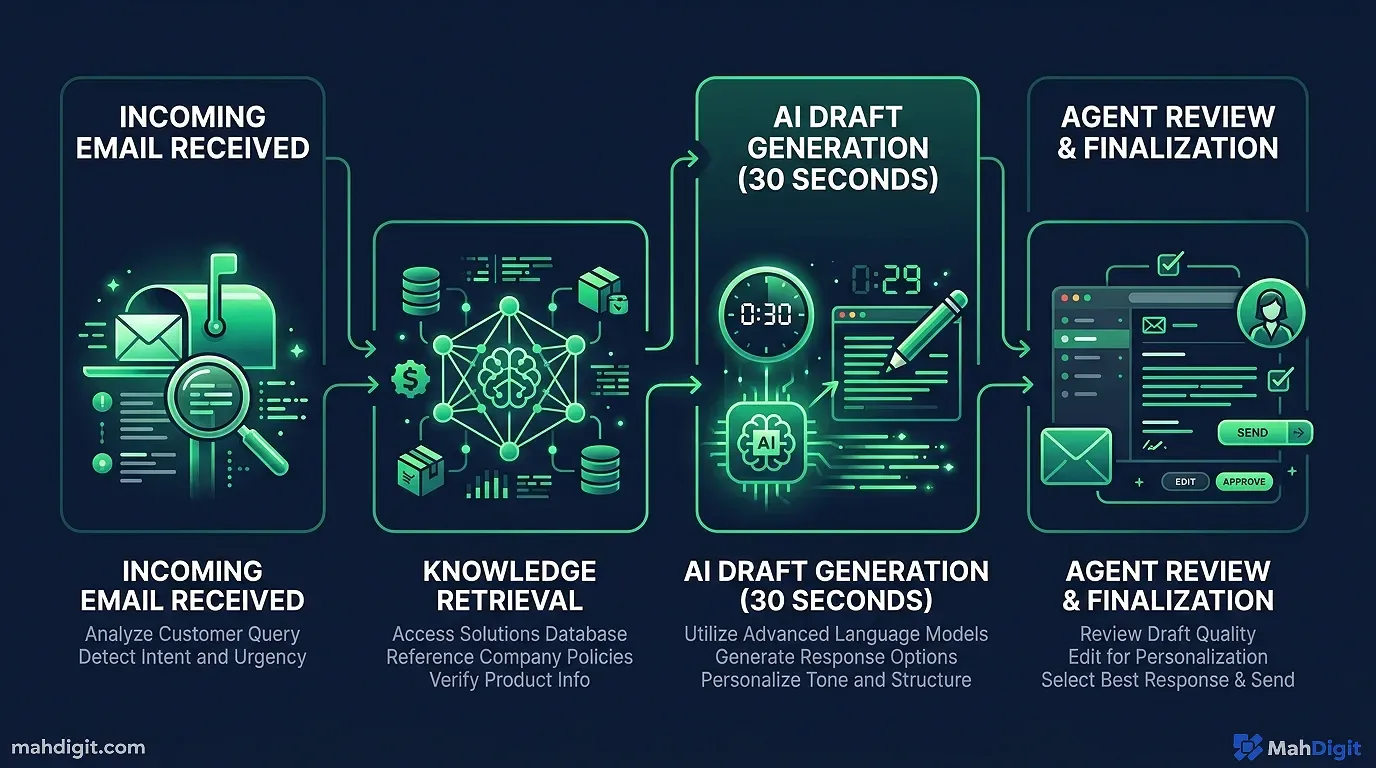
Customer emails are one of the most consistent time drains for independent companies. Pricing inquiries, minor complaints, project follow-ups, quotes each one feels slightly different, but many follow predictable patterns that consume large amounts of cognitive energy.
How to Do It
Keep a simple, accessible template library in a Notion document or Apple Notes. When a routine customer email arrives, copy the email text and use a standardized prompt like:
Here's an email from a customer: [paste email text]

Write a professional, friendly reply that:
- Acknowledges their specific question/concern immediately
- Answers it clearly and decisively
- Ends with an invite to follow up if they need more help

Tone: warm but efficient. Maximum 100 words.
I’ve tested this exact framework across wildly different business types my own freelance consultancy, a local cleaning service, and an boutique online shop. The outputs are consistently good enough to send with minor human edits, not major rewrites. One agency owner I consult with handles 40+ customer emails a day; she estimates this specific approach cut her daily email triage time by 60%.
What to Watch For
Never hit send without reading. Read every AI-drafted email before it leaves your outbox. The model doesn’t know about the customer’s purchase history, recent complaints, or relationship nuances. Use it to draft the heavy lifting; use your human judgment to approve and send.
Win 2: Social Media Content Repurposing
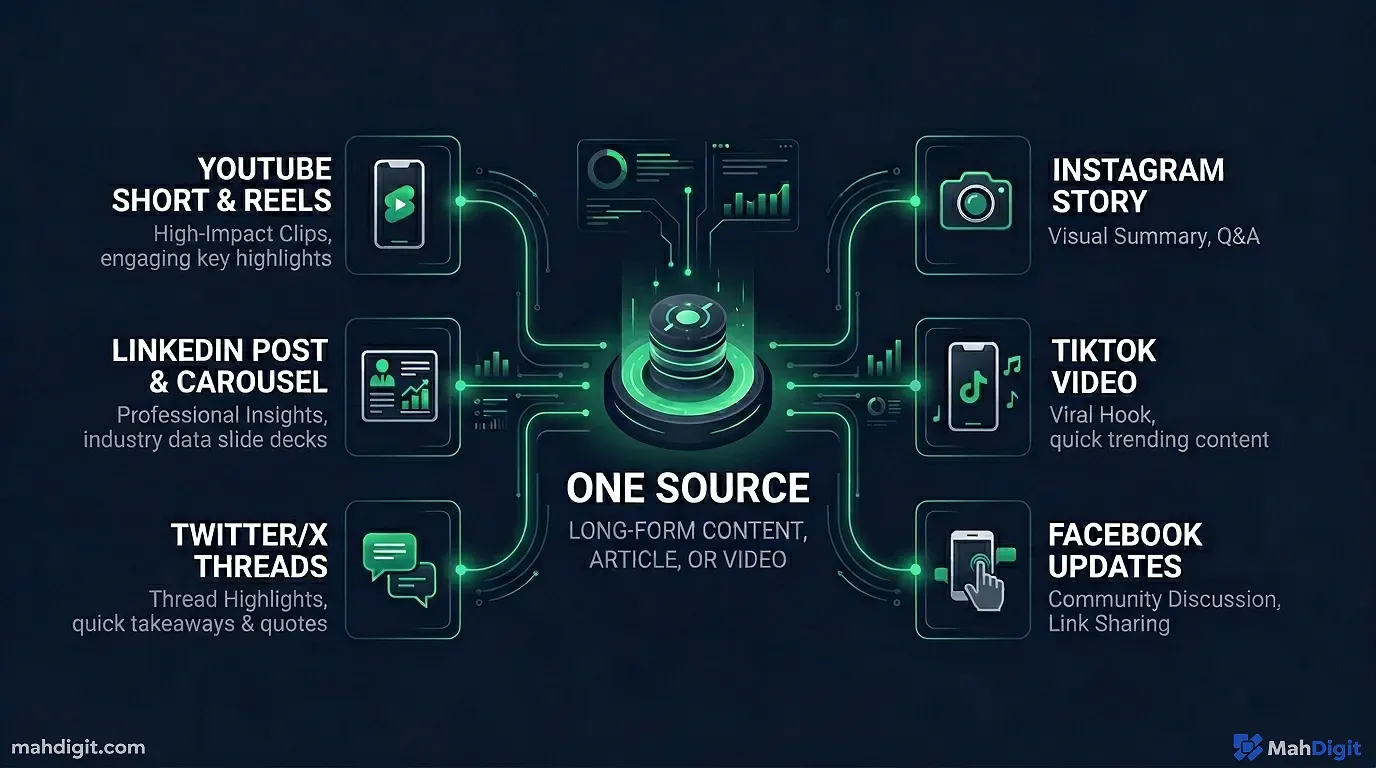
Most founders struggle to post marketing content consistently. The actual content creation feels like an unpaid second job. The fix isn’t buying a fancier scheduling tool it’s adopting a ruthless content repurposing workflow to automate social media posts with AI.
The One-to-Five Method
Take any piece of content you already created or know intimately well a blog post, a detailed product description, a glowing client case study, or a long testimonial and use AI to split it into 5 unique social posts tailored for different platforms.
The Prompt:
Here's a short case study about a recent client result: [paste content]

Create 5 targeted social media posts based on this source material:
- 1 LinkedIn post (professional, story-driven, formatting with line breaks, 150 words)
- 2 Instagram captions (visual-first format, one structured as tips, one as a narrative)
- 2 Twitter/X posts (under 280 characters each, hitting two different angles)

Keep the tone [describe your preferred brand tone, e.g., authoritative but approachable].
This works beautifully because you’re giving the language model your actual source material your lived experience and concrete results rather than begging it to invent content from thin air.
The Time Math
If you write one raw case study or product update per week (which takes maybe 20 minutes), you can reliably generate 5 high-quality social posts from it in under 5 minutes. That is your entire week of social content marketing done by Tuesday morning.
Win 3: Meeting Notes and Action Items
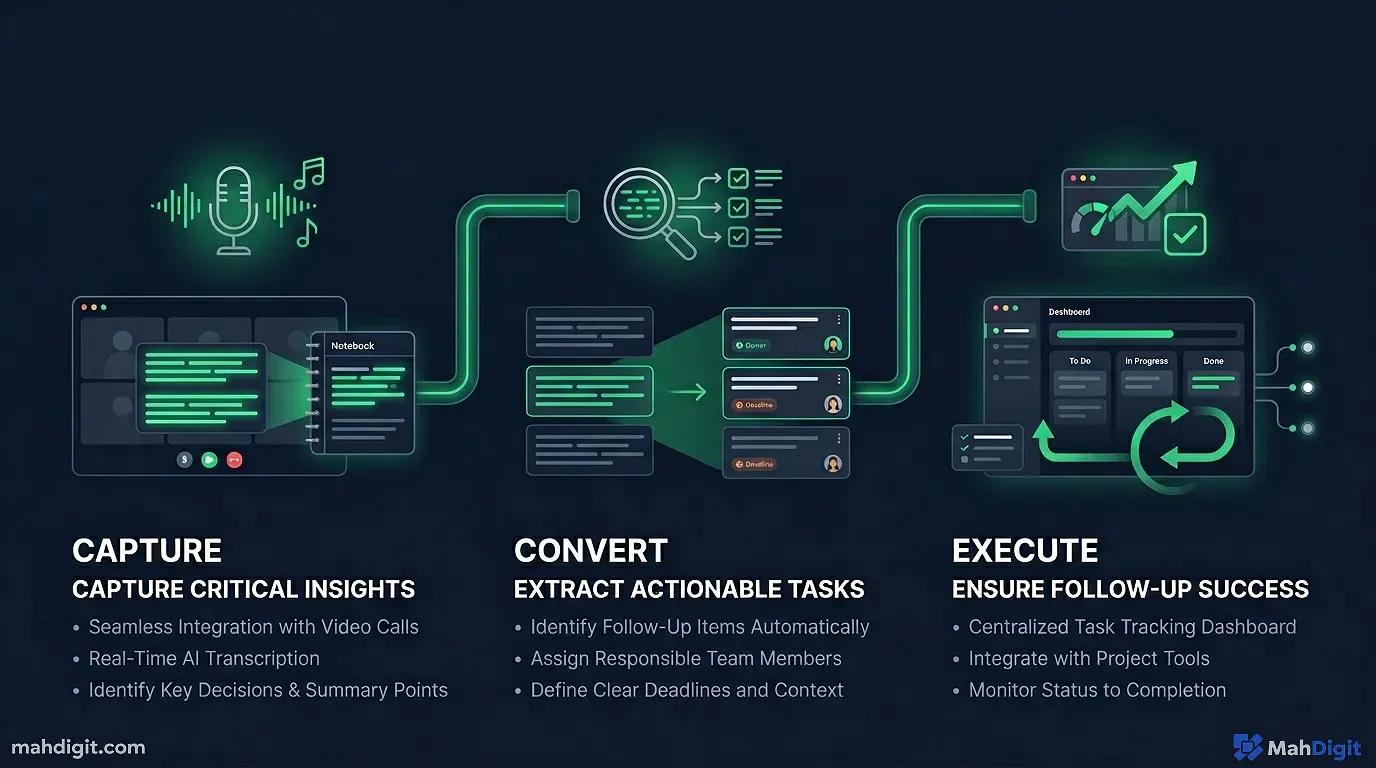
Implementing AI for small business meeting management has one of the highest ROI-to-effort ratios of anything on this list. If you run client meetings, supplier negotiations, or weekly team syncs, you are almost certainly losing critical action items between the meeting ending and someone actually executing the work.
The Simple Setup
Record your internal and external meetings (with explicit consent, obviously check your local recording laws). Most modern video platforms (Zoom, Teams, Google Meet) now allow automatic recording and raw transcription natively. Immediately after the meeting ends:
- Export or copy the raw text transcript
- Paste it into ChatGPT or Claude 3.5 Sonnet with this extraction prompt:
Here's a messy meeting transcript: [paste transcript]

Please cleanly extract:
1. Key strategic decisions made (in a bulleted list)
2. Action items with the specific owner's name (if mentioned) and any agreed-upon deadlines
3. Open questions that still need immediate answers
4. A concise one-paragraph summary designed for stakeholders who were not present
Real talk: the first time I saw this structured output after a chaotic 45-minute strategy meeting, I was genuinely shocked at how many minor decisions had been made that I’d already mentally forgotten. The AI doesn’t dynamically rank items by how confident people sounded it just captures what was said and promised.
If you have a slightly larger budget, dedicated tools like Otter.ai or Fireflies handle the audio transcription automatically and feature built-in smart summaries. But even without jumping to a paid specialist tool, the manual copy-paste method works well.
Win 4: Drafting Initial Hiring Documents
Writing a robust job description is one of those administrative tasks that sounds deceptively simple until you’re staring blankly at a blinking cursor. What are the actual daily responsibilities? What specific software skills actually matter? What’s the right tone to attract talent without sounding corporate?
This is a specific area of AI for small business where language models truly shine. Because AI models have been trained on millions of historical job descriptions, their output genuinely reflects standard industry expectations for specific roles.
The Prompt:
Write a compelling job description for a [role title] at a small [type of business].

The core role involves: [write 2-3 messy sentences about what they'll actually do daily]
We are looking for someone who: [list key traits or non-negotiable skills]
Compensation structure: [salary range or leave out]
Work Location: [remote/hybrid/in-person]

Tone: professional but human we're a small agile team, not a large corporation.
Format to Include: Brief company overview, core responsibilities (6-8 bullets), strict requirements (5-6 bullets), and a brief paragraph about our working culture.
When I recently hired a part-time virtual assistant, I used this exact prompt. I got a incredibly solid first draft in under sixty seconds. My manual editing process took 12 minutes to add my specific software requirements and adjust the cultural voice. This is exponentially faster than staring at a blank page.
Win 5: Lightning Fast Competitive Research
Local companies often operate completely blind regarding formal competitive intelligence usually because the founder has no time to conduct a formal market analysis. AI doesn’t magically replace proper, rigorous market research, but it can accelerate how quickly you identify positioning gaps.
What to Ask the AI
I heavily rely on Perplexity AI for this analysis rather than ChatGPT. Perplexity dynamically sources its answers directly from the live web and explicitly cites where every piece of information came from. Ask:
What are the top 5 main competitors for [your type of business] in [your exact city/market location]?
Historically, what do local customers typically complain about regarding these specific providers in their reviews?
What explicit features make the -rated businesses in this specific space stand out?
Then, take that structured output, pivot back to Claude or ChatGPT, and push it further: “Based on these specific competitor weaknesses, what 3 marketing positioning angles could a new, small [type of business] use to differentiate?”
I deployed this exact approach for a client running a boutique digital marketing agency. In roughly 30 minutes of prompting, we identified two large positioning gaps their local competitors were entirely ignoring regarding mobile optimization. It wasn’t a comprehensive master strategy, but it was an incredibly actionable starting point.
Win 6: Content Marketing Production (The 80/20 Approach)
If you have repeatedly thought “I really should be writing more content to drive SEO, but I never have time,” using AI is a effective partial solution. I say partial because AI is not going to automatically produce exceptional, -ranked, publish-ready content while you sleep. What it does do is eliminate the most time-consuming friction point: outlining and drafting the boring connective tissue.
The 80/20 Production Method
Ask the AI to do the 80% mechanical work:
- Generate a comprehensive, 10-point outline for a niche topic you understand .
- Draft the repetitive explanatory sections based tightly on your bullet points.
- Write a standardized introduction and a logical conclusion.
You do the 20% high-value human work:
- Edit the draft heavily for your specific voice, cutting any robotic adjectives (“delve,” “leverage”).
- Inject specific, proprietary examples from your actual business experience.
- Add your contrarian opinions or unique processes that the AI couldn’t possibly know.
The final published post feels like yours because the core thesis is yours the AI simply handled the invisible scaffolding. For weekly newsletter content, this framework works exceptionally well for curated formats like: “The 5 things we noticed in the market this month” or “Here is what changed in our industry and what you need to do about it.”
As we thoroughly covered in our guide to AI for content creators, the human experience layer is where the actual market differentiation happens. AI output without your lived experience produces worthless generic content; your lived experience augmented with AI produces fast, premium content.
Win 7: Simplifying Complex Financial Data
Not every founder is naturally comfortable buried in complex spreadsheets. If you routinely have monthly performance reports, dense sales data, or large expense logs sitting untouched in PDF format because analyzing them takes too much cognitive load, AI can rapidly extract the signal from the noise.
The Analysis Method
Export your raw business data as a clean CSV file or simply copy-paste the most relevant numerical columns. Upload the raw text to ChatGPT or Claude and use this prompt:
Here is my raw sales data for the last 6 months: [paste data or attach CSV file]

Please act as a financial analyst and:
1. Identify the top 3 overarching revenue trends you notice immediately
2. Flag any bizarre anomalies, unusual spikes, or glaring outliers
3. Tell me explicitly which months were above and below our average, and by roughly what percentage
4. Suggest 2-3 hard strategic questions I should be asking myself about this specific data
I used this on my own Stripe export data last quarter and the AI instantly flagged that my churn rate spiked predictably every single time I ran a specific type of promotional campaign. I hadn’t noticed the correlation at all.
Fair warning: AI tools can easily make basic calculation errors, especially when handling complex percentages or multi-step math formulas. It will not replace your certified accountant. Always sanity-check the macro numbers against your original source data before making large financial decisions.
How to Prioritize Your Implementations
You do not need to implement all seven workflows today. Pick your starting point based on where your worst bottleneck is right now:
| If your biggest daily time drain is… | Start your AI implementation with… |
|---|---|
| Endlessly responding to customer inquiries | Win 1 (Email reply templates) |
| Finding time to post on social media channels | Win 2 (Content repurposing) |
| Losing track of crucial meeting decisions | Win 3 (Meeting note extraction) |
| The hiring process taking forever | Win 4 (Drafting job descriptions) |
| Not knowing your local competitive position | Win 5 (Competitor research sprints) |
| Inconsistent organic content marketing | Win 6 (Blog/newsletter drafting) |
| Avoiding your own financial spreadsheets | Win 7 (Financial data summaries) |
Pick one workflow. Commit to using it consistently for two full weeks. Only after it becomes a habit should you add another. The single biggest mistake I see when implementing AI for small business is trying to automate the entire company simultaneously it becomes overwhelming, everything breaks, and the founder ends up doing none of it properly.
Common Mistakes Founders Make with AI
Treating AI like a standard Google search. You get exponentially better results from providing specific, context-rich prompts than from typing short question queries. If the output you receive is too generic or boring, your prompt was almost certainly too vague. Feed the machine context.
Refusing to build a prompt library. When you discover a prompt structure that well handles a recurring weekly task, save it immediately. A simple Notion document or even a basic text file containing your best prompts can save you dozens of hours over a financial quarter.
Expecting flawless, publish-ready output on the very first try. Iteration is a normal and expected part of the workflow. Responding to the AI with “make it 50% shorter” or “make it sound slightly more formal” takes 5 seconds of typing and significantly improves the usability of the final result.
Delegating tasks that require your human judgment. Complex client relationship decisions, nuanced pricing strategy pivots, or difficult disciplinary conversations with employees AI can help you organize your thoughts for these situations, but the final execution must be purely human.
Key Takeaways
Small businesses that successfully integrate AI operations do it incrementally they focus on one administrative task type at a time, building reliable habits until the workflow becomes entirely natural. These minor hourly wins compound .
- Implement AI for small business by starting with your single biggest recurring time drain.
- Good, specific prompts make all the difference overload the model with context.
- Always review and edit AI output before using it externally with clients.
- Intentionally save the exact prompts that work well you will use them repeatedly.
- The human layer (your lived experience, your judgment, your industry relationships) remains completely irreplaceable.
Related Articles
What’s Next
-
See our AI for Content Creators guide for more tips on using AI for content creation.
-
If you’re new to AI? Our AI Email Writing: Get Inbox Zero Without Spending Hours covers the absolute foundations in plain, non-technical language.
Got a specific business operations challenge where you’re trying to figure out if AI can genuinely help? Reach out to our team and ask us directly.
