Basic code completion was the gateway drug for the engineering world. I vividly remember the very first time GitHub Copilot magically suggested an entire, fully-functional sorting function solely from a messy comment I typedthe intense feeling that software development had genuinely, irrevocably changed forever. But that initial shock was a couple of years ago. The development tooling since then has expanded well beyond simple predictive autocomplete, yet the vast majority of working developers are still severely under-utilizing what is actually available on the market today.
I write code dailyprimarily Python for heavy data pipelines and JavaScript/TypeScript for complex frontend automation and agency side projects. I am not a mythological 10x developer by any stretch of the imagination, but I have spent hundreds of hours evaluating every major AI coding assistant in 2025 and 2026. Therefore, I have formed incredibly strong, opinionated views about what genuinely accelerates velocity and what is purely venture-backed hype.
This is the definitive, practical breakdown covering the exact AI tools for developers who want to know what software is actually worth investing their time and subscription money into this year.
The AI Categories That Actually Matter to Engineers
Artificial intelligence has become profoundly useful at multiple distinct, complex stages of the software development lifecycle, not just generating the raw code syntax. Before breaking down each tool by name, here is the functional operational breakdown categorized by engineering problem type:
| Development Stage | What AI Specifically Helps With Immediately | The Elite Best-in-Class Tools |
|---|---|---|
| Writing Core Code | Boilerplate generation, function logic, generic architectural patterns | GitHub Copilot, Cursor IDE, Claude 3.5 Sonnet |
| Deep Debugging | Complex error diagnosis, large stack trace translating, log pattern analysis | Claude 3.5 Sonnet, Cursor IDE |
| Unit Testing | Scaffolding generation, identifying weird mathematical edge cases | GitHub Copilot, ChatGPT |
| Documentation | Inline comments, large READMEs, compliant OpenAPI docs | Claude 3.5 Sonnet, GitHub Copilot |
| Code Review | Architecture feedback, obvious security flaws, readability checks | Claude 3.5 Sonnet, Cursor IDE |
| Rapid Learning | Explaining heavily obfuscated legacy code, learning new dense frameworks | ChatGPT (GPT-4o), Claude 3.5 Sonnet |
The tools naturally overlap significantly in their marketing claims. Where they actually differ in reality is how well they integrate directly into your existing command-line workflow and how they handle context switching in complex categories.
AI for Writing Core Code and Architecture
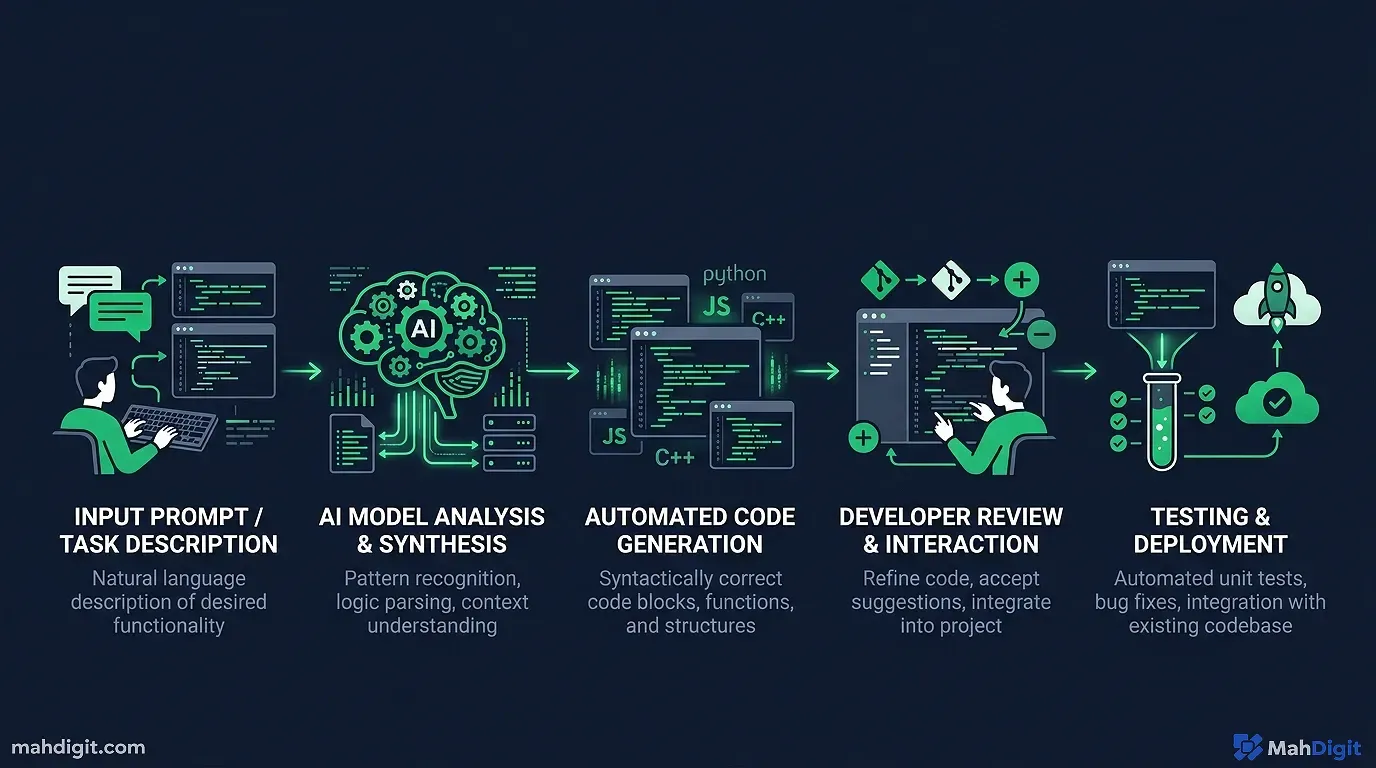
GitHub Copilot Still the Reliable Daily Driver
GitHub Copilot remains the most wildly popular, widely adopted AI coding assistant on the planet, and for incredibly straightforward, pragmatic reasons: it integrates directly natively into VS Code and JetBrains, it is exceptionally fast, and it is genuinely elite at generating the 80% of mundane connective code that follows common open-source patterns.
Where GitHub Copilot earns its $10 monthly keep every single day:
- Aggressive Boilerplate Generation large CRUD operations, standard API call formatting, dense data class definitions, and bloated YAML config files. I personally write the overarching architecture; Copilot automatically fills the predictable, boring structural syntax well.
- Instant Test Generation Right-click any complex function, and directly ask Copilot to generate tests. The edge-case coverage isn’t going to be flawless, but I receive a large, functional boilerplate starting point in four seconds rather than manually typing syntax for ten minutes.
- Context-Aware Autocompletion Unlike traditional old-school IDE autocomplete, Copilot actually understands what you are conceptually building. It suggests an entire function parameter layout that fits the specific surrounding codebase pattern, not just guessing the next generic Python syntax.
Honest Senior Developer Caveat: Copilot is noticeably, frustratingly weak on entirely novel logic, specialized mathematical algorithms, or anything requiring niche proprietary domain knowledge that wasn’t well-represented in its GitHub training data. For those intense, high-complexity tasks, I immediately switch my workflow to a heavy chat-based reasoning tool.
Cursor IDE The Ground-Up AI Rebuild
Cursor is an incredibly popular VS Code fork built tightly with deep, native AI integration running through its veins. It is not just an extension or a pluginthe entire fundamental editor architecture is designed primarily around AI-assisted software development logic. The large, key differentiating features:
- The Composer Engine You type out what complex feature you want to build (in plain natural language), and Cursor forcefully modifies the syntax across multiple distinct files in your codebase to implement it simultaneously. Not just writing one simple functionbuilding an entire cross-file feature.
- God-Tier Codebase Context Cursor understands the full large codebase you are working inside, not solely the current
.jsfile you have open. This matters immensely when you ask it ” how does our weird authentication middleware work?” or “where is the database connection dynamically handled?” - large Multi-File Edits Ask it to refactor a embedded legacy parameter across 14 multiple connected files; it physically executes the refactoring accurately.
I migrated to Cursor as my primary, daily IDE for all major side projects about eight months ago. For greenfield MVP development where I need to move incredibly fast, it is blisteringly faster than anything else I’ve touched. For huge, monolithic, decade-old existing codebases, the broad context handling is visually impressive but definitively not perfectit occasionally hallucinated how heavily decoupled services were actually connected.
Pricing: There is a generous free tier with strict query limits; the Pro tier is $20/month for power developers who need high usage.
Powerful AI for Deep Debugging
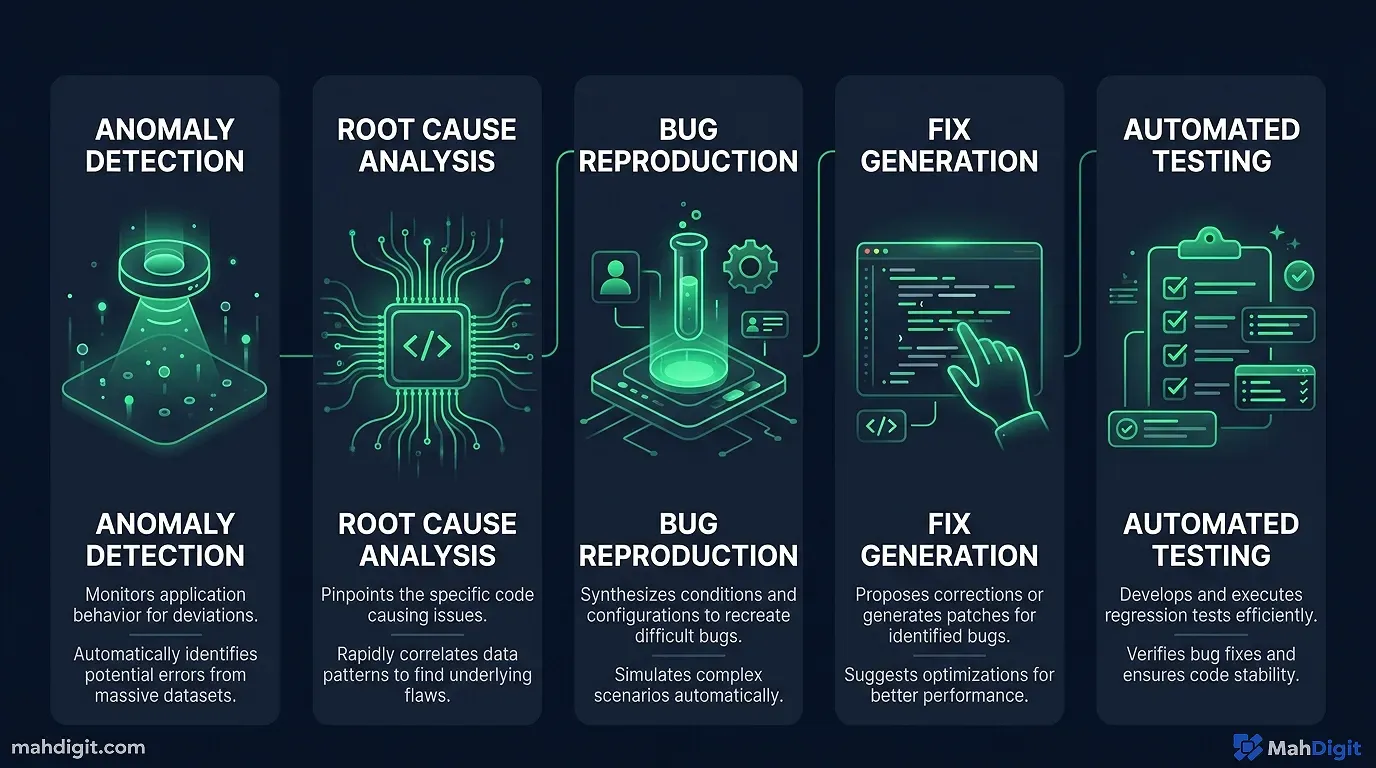
This specific category is where I have personally witnessed the most tangible, financially measurable time savings. debugging is very frequently 70% reading and comprehendingliterally figuring out what the terrible legacy code was actually trying to do, why the cryptic error occurred, and what the syntactical fix would optimally be. AI tools essentially short-circuit huge amounts of that painful reading and translation time.
Last February, I spent three miserable hours tracking down a severe React memory leak in a client’s heavy dashboard. I finally dumped the entire 400-line component into Claude with the browser profiling trace. Claude spotted the un-cleared interval hook in 14 seconds. I felt simultaneously amazed and incredibly foolish.
The Claude Debugging Workflow Protocol
When I inevitably encounter a production error I cannot immediately intuitively diagnose, my rigid workflow is this:
- copy the entire, large error message and the full raw stack trace from the terminal.
- Copy the relevant chunk of the function or the suspected module of code.
- Paste both large texts directly into Claude 3.5 Sonnet with this explicit prompt: “Here is a serious error I am getting, and the exact code that produces it. Carefully explain what is causing the underlying error and explicitly suggest the most elegant, optimal fix.”
Claude’s modern ability to read, reason, and structurally logic about dense code is genuinely astonishingly strong. It correctly identifies the actual root causerather than lazily patching just the surface symptomroughly 75% of the time on the very first try. The other 25% requires active conversational follow-up, but even then, it is still exponentially faster than solo, frustrated debugging at 2
AM.For particularly gnarly, nightmare bugssubtle race conditions, unexpected global state mutations, or complex asynchronous promise behaviorI utilize chain-of-thought prompting: “Carefully walk through what this dense syntax does step-by-step, explain the variable state at each step, and then identify where the failure point likely explicitly occurs.” The forced step-by-step approach consistently surfaces strange issues that a superficial human quick glance misses.
For large Log Analysis
You can instantly paste a horrible 1,000-line raw text log file into Claude and ask it to actively identify any subtle anomalies, recurring error patterns, or severe slow-query performance bottlenecks. This is significantly, wildly faster than manually reading endless scrolling lines of logs. I rely on it heavily for Kubernetes server logs, chaotic CI/CD pipeline failure logs, and verbose database debugging output.
AI for Automated Unit Testing
Getting working developers to actually sit down and write comprehensive, 90% coverage unit tests is a notoriously, universally hard cultural problem. Implementing proper AI tools for developers does not eliminate the philosophical problem, but it significantly, permanently lowers the painful activation energy required to start.
GitHub Copilot’s Native Test Generation
When I actively select a large function, right-click, and select “Generate Tests” (in VS Code using Copilot), the AI output consistently covers the incredibly obvious baseline test casesthe baseline happy path, the common type-error edge cases, and checking the null/undefined/empty string input behaviors where statistically relevant.
It explicitly will not well cover your specific, proprietary business logic edge cases that aren’t mentioned in the code comment, but it eliminates the awful “write the boring Jest mocking scaffolding entirely from scratch” step. I actively use this automated block as a starting point, then manually program the complex, high-value tests for the specific business cases Copilot doesn’t know about.
Using ChatGPT for Elite Test Case Conceptual Design
For incredibly complex algorithmic functions where I mandate bulletproof, 100% test coverage, I thoroughly describe the function and its business purpose to ChatGPT and ask: “What are the 15 craziest, most obscure edge cases, boundary failures, and security modes I should test for this specific component? Give me an exhaustive list before I write any actual code.”
This is a conceptual thinking exercise just as much as it is a code generation task. The AI almost always identifies bizarre edge cases (like weird unicode string behavior or timezone offset math) that I flat out hadn’t considerednot because the machine is a smarter programmer, but because the machine is not anchored to the same biased assumptions I accidentally made while originally building the function.
AI for Robust Code Documentation
Proper technical documentation is the large administrative task every ambitious developer technically knows they should actively do more of, and almost everyone routinely does less of. AI effectively removes the writing friction significantly.
Function-Level Docstrings and Comments
GitHub Copilot generates inline, readable comments completely automatically as you type syntax out. For the vast majority of standard code, the generated language is accurate and saves the intense mental context-switch required to write English sentences while thinking in JavaScript. I usually tweak the phrasing slightly, but the technical substance is accurate.
Extensive README and Advanced API Documentation
This is where Claude 3.5 Sonnet shines. I forcefully paste an entire REST API function signature, the entire routing implementation, and any relevant data model context into the chat, then command it: “Write clean, professional API documentation for this specific endpoint: extensive description, all required JSON parameters (with explicit data types and rules), the exact return value schema, and a functional cURL usage example.”
For an entire large backend API, I iterate this exact prompt function by function. Yes, it still takes manual timebut it is astonishingly faster than writing dense documentation completely from scratch, and the visual output is significantly more consistent than what most stressed developers will write manually under a Friday deadline pressure.
The Underrated Superpower: AI for Code Review
This is an incredibly underrated operational use case. Immediately before submitting any large pull request, I run a quick AI code review on the substantial file changes.
My standard audit prompt: “You are a cynical, experienced senior software engineer conducting a code review. Extensively review this specific codebase for: (1) subtle potential bugs or edge cases, (2) serious Big-O performance issues, (3) severe SQL or injection security concerns, (4) readability formatting, and (5) any missing error handling logic. Give specific, immediately actionable feedback.”
Claude consistently catches incredibly subtle things I completely missnot because it possesses a better computer science degree, but simply because it reads the entire code completely fresh with zero preconceived assumptions about how it is “supposed” to work. It has caught large real bugs in my code this way just before production: a completely missing null auth check, a classic off-by-one array error, and a terrible case where an async database function wasn’t properly awaited inside a Promise.all.
This is not a permanent replacement for a senior human code review. It is simply an aggressive pre-flight automation check that makes your PR exponentially better before your incredibly busy teammates even see it.
AI for Fast Learning and New Frameworks
When you are required to become productive in a completely new backend framework or obscure language quickly, having a dedicated AI drastically accelerates the intellectual learning curve.
My exact systematic approach for learning a new technology rapidly:
- Start with a deep conceptual overview Ask ChatGPT or Claude to explain the core architectural concepts of the framework, how it philosophically differs from the legacy tech I already know well, and what the large “gotchas” are.
- Build a hard concrete project Forbid the AI from showing me a useless “hello world,” and ask it to help me build a minimal but actually realistic working example (like an active websocket chat app) that touches the framework’s actual complex features.
- Debug as you go Paste large weird errors and demand to know why they happen. This builds structural intuition faster than reading dry docs.
I was forced to learn the bizarre basics of a new dense Go concurrency library last month this exact way. What I historically estimated would require a full week of reading dense API documentation only took two intense days of heavily prompted building.
My Recommended main Developer Stack for 2026
After testing everything under the sun, here is what I recommend for different engineering operational use cases:
| The Engineering Role | Absolute Primary Tool | The Secondary Backup | Deep Operational Notes |
|---|---|---|---|
| Full-Stack Engineer | Cursor IDE | Claude 3.5 Sonnet | Cursor for sheer raw typing flow; Claude for very complex architectural reasoning |
| Backend / DB Engineer | GitHub Copilot | Claude 3.5 Sonnet | Copilot inside the editor; Claude exclusively for terrible SQL debugging |
| Data / ML Engineer | ChatGPT (Code Analysis Mode) | Claude 3.5 Sonnet | OpenAI is excellent for heavy visual data analysis tasks |
| DevOps / Infra Automation | Claude 3.5 Sonnet | ChatGPT | Elite for large terraform script generation and obscure config troubleshooting |
| Learning CS Student | ChatGPT (Free Tier) | Copilot (Free for students) | Generous free tiers genuinely cover the vast majority of all learning use cases |
The one main technological combination I honestly advise giving anyone starting seriously right now: GitHub Copilot running natively inside your VS Code window for the daily, rapid coding flow, and an open browser tab dedicated to Claude 3.5 Sonnet exclusively reserved for anything that requires heavy architectural reasoning, deep explanation, or complex debugging of large files.
large Common Mistakes Developers Confidently Make with AI Tools
Recklessly trusting generated syntax without running it. AI code incredibly frequently contains subtle semantic bugs. Always run it. Always review it. The code might structurally look brilliant and still completely fail in production edge cases. Treat it like code written by a confident but junior intern.
Asking incredibly lazy, vague questions. Saying “please fix this bug” is a notoriously terrible, useless prompt. A effective prompt looks like: “This Python function returns None when called with an empty list, but based on the schema it should return an empty list. Here is the entire code and the explicit expected behavior what is structurally wrong with my approach?”
Using one tool for everything. Every single language model has a specific operational sweet spot. using Copilot to make large 30,000-foot system architecture microservices decisions, or using an expensive Claude API specifically for simple inline autocomplete is incredibly sub-optimal. Match the specific intelligence tool to the specific technical task.
Arrogantly skipping a human code peer review. AI-assisted code review is solely a supportive supplement, not a managerial substitute. Your human team members understand the large legacy codebase, the undocumented chaotic product requirements, and the true business impact of failure in ways a language model cannot structurally comprehend.
The Key Takeaways
The latest AI tools for developers are powerful exclusively when you strategically interject them across the complete, full development cycle, not merely just using them to autocomplete a CSS class structure.
- GitHub Copilot remains the main daily engineering driver: it is fast, integrated, and phenomenal for knocking out boilerplate and vast unit tests.
- Cursor IDE is the far better choice if you want deep, sweeping AI integrations natively embedded into your core editor experience.
- Claude 3.5 Sonnet wins almost every head-to-head match on debugging, writing heavy documentation, code reviewing, and learning complex topics.
- Using Chain-of-thought prompting functionally unlocks significantly, remarkably better deep debugging results when the code just breaks.
- AI tools simply supplement your core engineering skill; they will never completely replace the fundamental requirement of actually understanding the critical code you ship to your users.
What’s Next
- seeking the full, extensive landscape of modern productivity AI tools built entirely beyond coding? Read our updated 10 Best AI Tools for Productivity in 2026.
- If you are interested in automating workflows completely beyond just source code connecting marketing and sales tools natively with AI pipelines our technical AI Workflow guide comprehensively covers the extraction method.
- The fundamental strategies found in our AI Prompting Guide applies well directly to complex coding prompts the strict R-C-T-F formula works just as well for chaotic architectural debugging questions as it routinely does for standard marketing writing tasks.
Related Articles
- AI for Small Business: 7 Quick Wins to Start This Week
- AI for Students: A Practical Guide to Studying Smarter
- AI Meeting Notes: Stop Losing Action Items After Every Call
External Resources
- GitHub Copilot Documentation official guide to setting up and using Copilot in VS Code and JetBrains
