A few years back, I almost lost a major consulting client because of a single forgotten detail. During a frantic 45-minute kickoff call, the client casually mentioned they needed the final delivery formatted as a raw CSV, not an Excel file. I nodded, kept listening, and promptly forgot to write it down. When I delivered the wrong format two weeks later, the trust was entirely broken.
I used to lose crucial action items from meetings constantly. Not because I wasn’t paying attentionbecause human brains are terrible at actively listening to complex information while simultaneously summarizing and typing it out. My manual notes were always a flawed, rough approximation of what was actually said.
I decisively switched to using automated AI meeting notes over a year ago. The tangible difference in my business operations: I now possess a complete, instantly searchable transcript of every single client meeting, a structured summary highlighting concrete decisions, and zero situations where anyone awkwardly follows up asking, “So… what did we actually decide on that call?”
This guide covers the entire operational setup: how to select the right transcription tool for your specific business size, how to configure the perfect AI meeting notes summary workflow, and what to do when the transcription robot inevitably misunderstands you.
Why AI Meeting Notes Are Culturally Worth Setting Up
The business case for automation here is completely straightforward, but let me attach some concrete operational math to it.
What you are currently losing: In most professional meetings, roughly 30-40% of what’s said is never formally documented. Commitments made verbally in a Zoom window become incredibly fuzzy within 24 hours. Action items decay faster than almost any other kind of professional information. According to recent management data, nearly half of all undocumented action items generated in team meetings simply never happen.
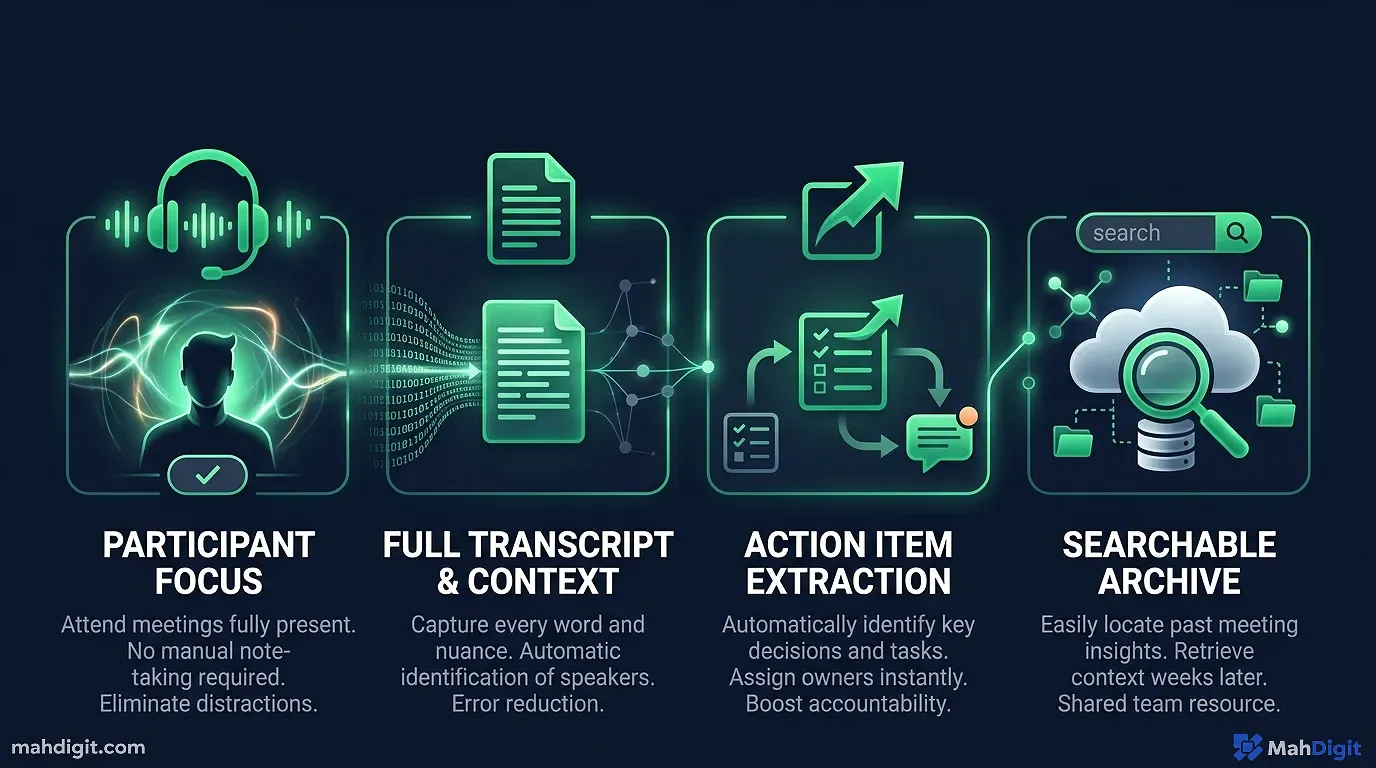
What AI meeting notes actually give you: A flawless, verbatim record that you can explicitly search weeks later (“What did Sarah say the budget cap was?”), a structured executive summary that takes three seconds to share with absent team members, and the automatic extraction of action items so they can be tracked.
The initial technical setup time is roughly 45 minutes. The compound time savings are 15-30 minutes per meeting day, unconditionally, forever.
The Core Two-Tool Technical Setup
The most resilient setup isn’t one large expensive enterprise tool; it’s two specialized tools working in tandem:
- The Transcription Layer Records the raw audio and transcribes the messy human conversation text chronologically.
- The AI Summarization Layer Ingests the raw transcript, understands the context, and extracts only the high-value signal.
You can eventually add a sophisticated third tool (an automation routing layer like Zapier) to push the output directly into your project management software, but you do not need to start there to see large ROI.
Step 1: Choose Your Core Transcription Tool
If You Already Use Zoom, Teams, or Google Meet Heavily
All three major enterprise meeting platforms now offer heavily integrated, built-in transcription capabilities:
- Zoom: Enable transcription in
Settings Recording Cloud Recording(requires a paid Pro plan or higher) - Google Meet: Click
Activities Transcriptsduring the live meeting (Google Workspace premium plan required) - Microsoft Teams: Click
More Transcriptto manually initiate transcription (Requires an active Microsoft 365 commercial subscription)
These are the absolute path-of-least-resistance options. The built-in transcription quality is surprisingly good on clear audio streams. The primary structural limitation: the raw text transcript remains trapped inside the platform’s ecosystem, meaning you must export it manually for advanced AI processing.
Otter.ai The Dedicated Market Leader
Otter.ai is the most popular, capable standalone meeting transcription service on the market today. It natively integrates with Zoom, Google Meet, Teams, and Webex. When you join a scheduled calendar meeting, Otter either joins automatically (appearing as a visible bot participant) or you can manually start recording directly from your desktop app.
What makes Otter superior to the built-in corporate options:
- Exponentially better native AI features built directly in (automated summaries, structured action item extraction, smart keyword tagging)
- Global search functionality across your entire history of meetings
- The free foundational tier (300 minutes/month) is incredibly generous for light personal use
- The Pro tier ($16.99/month) unlocks unlimited minutes and deeper AI capabilities
For most solo consultants and small agencies, Otter’s built-in AI meeting notes are robust enough to eliminate the need for a secondary tool entirely.
Fireflies.ai The Heavy Enterprise Alternative
Fireflies.ai is functionally similar to Otter but it was architected explicitly for heavy B2B team use. It integrates with serious CRMs (Salesforce, HubSpot, Pipedrive), automatically pushes meeting summaries into designated Slack channels, and possesses noticeably stronger multi-speaker voice identification technology.
For aggressive sales teams or account managers who need meeting outcomes logged cleanly in their CRM, Fireflies is unquestionably the better operational choice. Pricing scales similarly to Otter.
Step 2: Generate the Premium AI Summary
If you are using Otter.ai or Fireflies.ai, basic AI summaries are generated natively. However, they are frequently far too surface-level for complex, multi-stakeholder strategy meetings. Here is how I consistently get significantly better output.
The Manual High-Control Method
After every high-stakes meeting concludes, I immediately export the raw transcript text. I then paste it straight into Claude 3.5 Sonnet or ChatGPT with this heavily-tested extraction prompt:
Here is the notoriously messy transcript from our recent strategy meeting:

[paste raw transcript here]

Acting as a organized executive assistant, please create a structured meeting summary containing these elements:

**Meeting Executive Summary** (A tight 2-3 sentence overview of what was discussed)

**Key Strategic Decisions Made**
- [Bulleted list of actual, finalized decisions, explicitly excluding the debate leading up to them]

**Required Action Items**
| Action Required | Distinct Owner | Strict Deadline |
|-----------------|----------------|-----------------|
| [hyper-specific task] | [person's name if explicitly mentioned] | [date/time if mentioned] |

**Open Questions / Painful Unresolved Items**
- [Crucial things that need follow-up but simply didn't get decided on the call]

**Important Context for Future Reference**
- [Anything said that would be useful, contextual background knowledge three months from now]

CRITICAL INSTRUCTION: Be concise and specific. Explicitly flag anything genuinely ambiguous rather than having the AI guess the intent.
This specific prompt structurally produces a consistently elite meeting summary. Using the markdown table format for action items makes them infinitely easier to visually track and migrate to my task manager.
The Mandatory Human Quality Check
Never distribute AI meeting notes without running your human eye over the action items table specifically. Language models consistently make two specific types of behavioral errors here:
- Attribution hallucinations: Assigning a critical action item to the wrong team member when multiple people were rapidly talking over each other.
- Missed casual commitments: Failing to capture casual, thrown-away commitments (“Yeah, I’ll take a quick look into that vendor”) that didn’t use formal assignment language.
Both errors are incredibly common in modern models. read the generated action items before pasting them into Slack.
Step 3: Route the Output (The Power-User Automation)
For boring, recurring meeting types (weekly dev standups, routine client check-ins, Friday team retrospectives), you can fully automate the entire workflow so transcripts flow cleanly into an AI summary and directly into your management tools without a single manual click.
The Fully Automated API Workflow
Using a tool like Zapier or Make.com, I build this exact sequence:
- Trigger: Otter.ai successfully completes processing a new meeting.
- Action 1: Zapier automatically sends the raw transcript payload to the OpenAI API using my structured summary prompt.
- Action 2: Zapier takes the structured output and creates a new, well formatted page inside my Notion company wiki.
- Action 3: Zapier posts a condensed, 3-bullet summary to my team’s specific #project-updates Slack channel.
The total setup time is roughly two hours the very first time you build it. After that, it runs silently in the background indefinitely.
Handling Inevitable Transcription Accuracy Problems
No commercial transcription tool is flawless. If someone mumbles, the AI will transcribe gibberish. Here is how I handle the three most common technical issues:
1. Low Accuracy on Niche Technical Terms
Hyper-specific domain jargon (proprietary software names, obscure manufacturing terms, internal corporate acronyms) gets transcribed incorrectly far more often than basic conversational vocabulary. The Fix: Add a brief context injection note directly before your AI summarization prompt: “Note: This is a deep-dive meeting about B2B SaaS architecture. Key terms the transcript likely misspelled: [list your 5 weirdest internal acronyms here].” Additionally, in paid tiers of Otter.ai, you can permanently add your company’s custom vocabulary to their dictionary so the model learns to prioritize those weird words.
2. Chaotic Multiple Speakers Getting Confused
If the raw transcript consistently misidentifies who is speaking, it becomes impossible to attribute action items correctly. The Fix: force a cultural habit of asking all participants to quickly introduce themselves at the very start of the call: “Let’s each just quickly say our name so the AI note-taker can calibrate our voices.” Modern tools use audio fingerprinting, and this five-second opener solves 90% of speaker attribution failures.
3. Terrifyingly Poor Audio Quality
Coffee shop background noise, cheap laptop microphones, or three people overlapping their sentences will destroy transcription accuracy. The Fix: If I know a meeting had notoriously garbage audio, I explicitly note this before running my AI processing and I critically mandate a slow human review step before distributing the final summary to the client. The AI cannot summarize what it couldn’t hear.
Crucial Ethics, Privacy, and Legal Disclosure
This is operationally critical and I will be exceptionally direct about it: You must explicitly disclose that external meetings are being recorded and transcribed by AI.
In most North American and European jurisdictions, strict recording laws legally require at least one party to consent, and many states require two-party consent. Regardless of the law, baseline professional ethics and business trust demand you tell everyone involved. My standard operating procedure:
- For external calls: I mention it casually but explicitly at the very start of every single call with clients or vendors: “I’m going to have my AI note-taker run in the background of this call so I can focus purely on you instead of typing. Let me know if anyone isn’t comfortable with that.” Over the last 400 meetings, zero people have objected.
- For internal team meetings: Establish a permanent, written team norm via your employee handbook rather than manually announcing it every single Tuesday morning.
The AI transcription bot’s name and presence in a Zoom gallery view is visually obvious to participants. Being politely proactive about acknowledging it, rather than having a client nervously discover it ten minutes into a sensitive conversation, is the only correct professional move.
What to Actually Do With AI Meeting Notes
Capturing brilliant, beautifully formatted meeting notes is financially useless if they just sit dying in a Google Doc. They have to move into an action layer.
For single individual action items: Immediately migrate them directly into your actual task manager (Asana, Notion, ClickUp, Todoist) rather than leaving them in the notes document. Notes get passively re-read; task lists get acted upon.
For large project meetings: Always put the generated summary directly in the relevant project documentation space where the entire engineering or marketing team can instantly read it without asking you for a link.
For sensitive client meetings: Habitually paste the action items summary into a formal follow-up email to the client within two hours of hanging up. This immediately creates a legally-binding written record that everyone passively agrees to, which dramatically eliminates those miserable “I thought you said you were handling that…” situations three weeks later.
Common Mistakes Amateurs Make With AI Meeting Notes
Blindly trusting the AI summary without reading it. Especially the critical action items section. The language model does not know which commitments were casual brainstorming versus serious contractual promises. You do. Act like it.
Paying for transcription but skipping the AI processing. A raw, 50-page transcript is completely useless for rapid reference. A processed AI summary is useful for immediate action. You need both layers.
Not routing action items to a formal tracker. Keeping your critical action items buried at the absolute bottom of a meeting summary document instead of migrating them to your actual Jira/Asana system is how expensive mistakes happen. Move the tasks.
Forgetting to explicitly disclose the recording bot. Habitually recording clients without disclosing is a large breach of trust and potentially a severe legal liability depending on your state. Verbal disclosure takes ten seconds. Say it out loud.
Key Takeaways
Implementing AI meeting notes is one of the absolute fastest, highest-ROI technological setups any professional can build this year. The magical combination of flawless transcription + AI summarization + action item extraction reliably recovers easily 15-30 minutes per meeting day.
- Utilize your meeting platform’s built-in transcription if you are on a budget, or upgrade to Otter.ai/Fireflies for dedicated, powerful features.
- The specific architecture of your AI summary prompt heavily dictates the quality of the outputuse our specific structured table format to guarantee reliable action item extraction.
- review AI action items before distributing themattribution hallucinations and coverage errors are still common in 2026.
- Immediately migrate generated action items into a hard task tracker, not just a static document.
- Disclose the recording robot proactively on every single external callit builds trust and protects you legally.
Related Articles
- AI Email Writing: Get Inbox Zero Without Spending Hours
- AI for Content Creators: The Full Production Pipeline
- AI for Small Business: 7 Quick Wins to Start This Week
- AI for Students: A Practical Guide to Studying Smarter
External Resources
- Otter.ai Help Center: Getting Started with AI Meeting Notes official documentation for setting up transcription and AI summaries
