If I see one more “guru” on Twitter telling people to make $10,000 a month by selling AI-generated coloring books on Etsy, I might lose my mind. That market saturated completely by the end of 2024. If your side hustle relies on competitive consumer platforms where thousands of people are doing the exact same thing, you are not building a business; you are buying a lottery ticket.
I spent six months in 2023 trying to sell print-on-demand t-shirts generated by Midjourney. I made $42 after ad spend, and I wanted to throw my laptop out the window. I realized I was competing against literal bots mass-uploading a million designs a day. I pivoted. Hard.
In 2026, the real money in AI side hustles is incredibly boring. It happens quietly, in the background, running on cheap hardware you probably have sitting in a closet.
I am talking about B2B (Business-to-Business) automations running off a local home server. Local businesses are desperate for operational efficiency, but they cannot afford $10,000/month enterprise AI solutions. That gap is where you step in.
This guide breaks down my exact “2026 AI Side Hustle Stack” and four specific automations you can host locally to charge retainer fees to local businesses.
Why a Home Server Beats Cloud for AI Side Hustles
You might ask, “Why not just use cloud services like AWS or Google Cloud?”
You can. But when you are orchestrating heavy AI workloads specifically dealing with continuous data scraping, persistent local LLMs, and high-volume API routing cloud costs spiral out of control incredibly fast. A sloppy infinite loop in AWS lambda can cost you hundreds of dollars in a weekend. I know because I made a typo in a scraping script, went camping for three days, and returned to a $450 AWS bill for processing empty arrays.
Building a low-power home server utilizing an N100 chip or a refurbished off-lease corporate desktop (like a Dell Optiplex) provides a fixed cost. You pay for the electricity (which is negligible for these chips) and the internet connection you already have. You run the operations locally, and push only the final, lightweight data to cloud endpoints.
If the concept of local infrastructure excites you, I discuss the sheer power of these tools in my breakdown of best AI tools for productivity in 2026.
The Security Argument for Local AI
Aside from cost, local deployment is the only way I can legally sell these services to specific sectors. Medical practices (HIPAA compliance) and law firms will not let you send their client data to OpenAI’s public servers. By running an open-source model entirely inside my closet, the data never leaves my physical network until it is finalized and sanitized. This single selling point allows me to charge triple the standard rate. I dive deeper into these security protocols in my guide to AI Tools for Developers where data sovereignty is paramount.
The Core Software Stack
Before we get to the automations, you need the infrastructure. I do not code these automations from scratch in Python every time. I use a specific stack designed for resilience and rapid deployment. This stack is entirely free if you are willing to learn the command line.
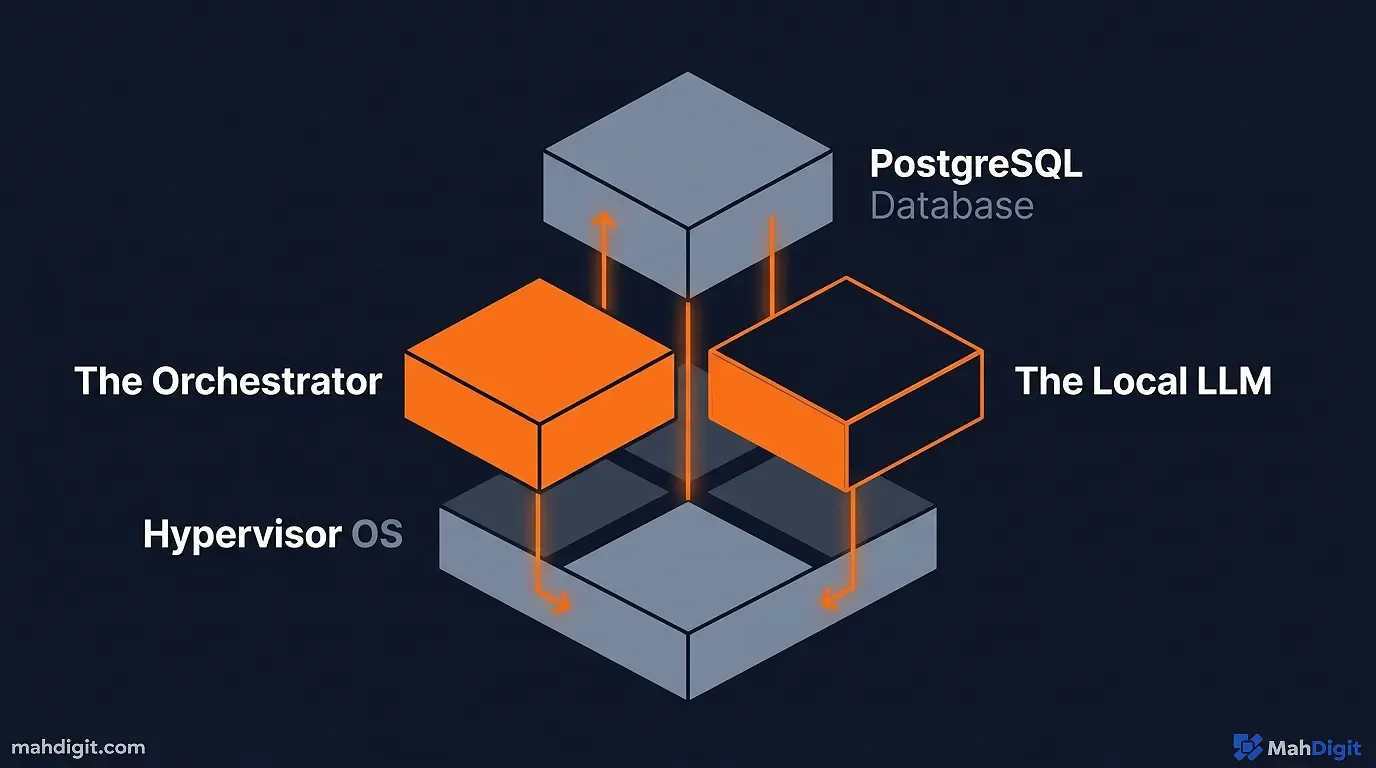
- OS / Hypervisor: Proxmox VE (Free, open-source). This lets me carve my single physical computer into multiple isolated “Virtual Machines.” If one bot crashes, it does not take down the entire server.
- The Orchestrator: n8n (Self-hosted). This is the brain. It is like Zapier, but because you host it yourself, you do not pay per task. N8n’s official documentation provides exhaustive tutorials on setting up a Docker instance in five minutes.
- The Local Brain: Ollama. This software lets me run open-source large language models (like Llama 3) entirely locally. No OpenAI API fees. No data privacy concerns.
- The Database: PostgreSQL. A reliable, free database to store the data my agents collect.
Once this stack is humming in the corner of your office, you have the equivalent of a digital workforce waiting for instructions. Here is what I tell them to do.
Automation 1: The Local SEO Review Aggregator
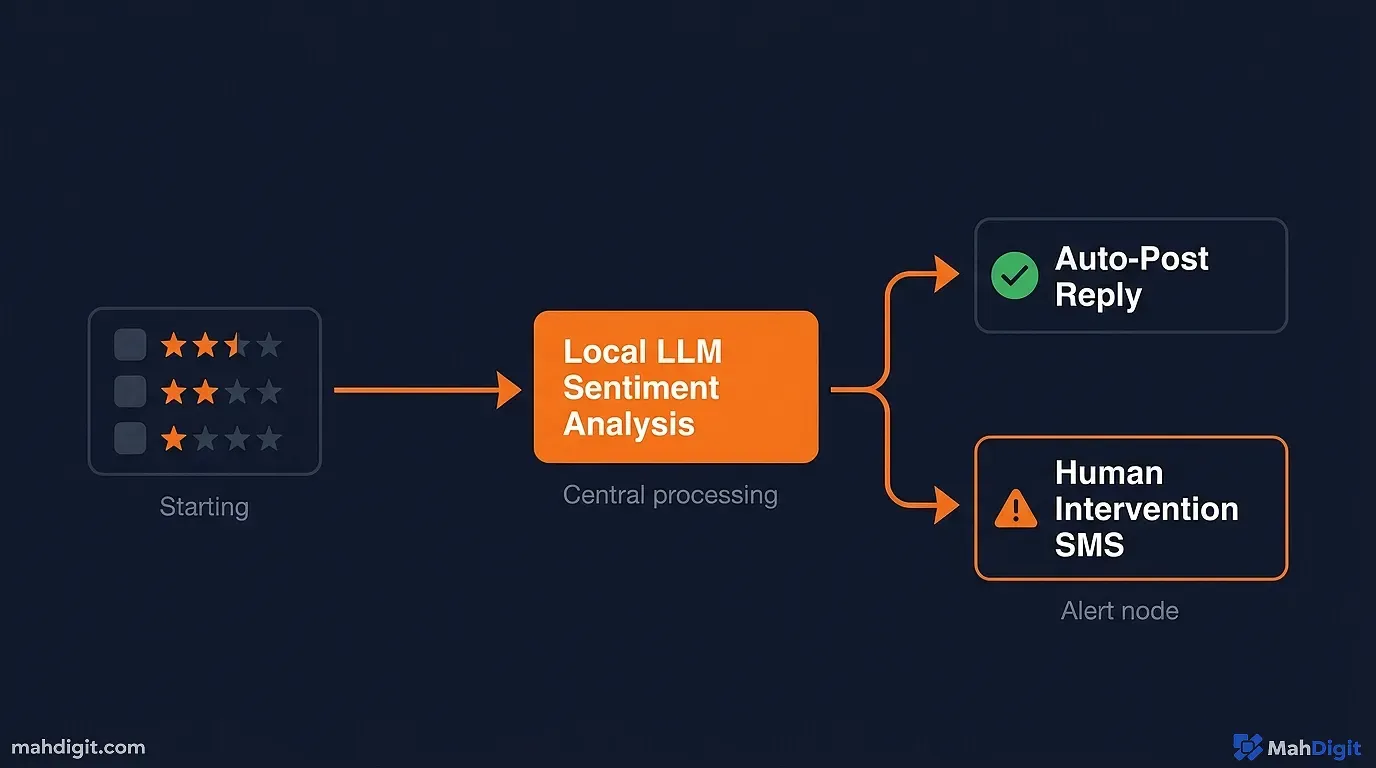
Local businesses (plumbers, roofers, dentists) live and die by Google Reviews. However, they are notoriously terrible at managing them. They either ignore reviews, or the owner spends four hours a month writing generic “Thanks!” replies.
The Hustle: You sell a “Reputation Management Engine” for $99 to $299 a month.
How the Server Automation Works:
- The Scraper: Your n8n instance uses a lightweight script to check the client’s Google Business Profile and Yelp every 12 hours for new reviews.
- The Contextual Pipeline: It pulls the text of the review, the star rating, and the reviewer’s name.
- The AI Evaluation: You prompt the local LLM:
Read this review. First, classify the sentiment (Positive/Negative). Second, draft a personalized, empathetic response as if you are the business owner. Do not sound robotic. Mention specific details from the review. If the review is negative, apologize and ask them to call the office directly. Do not offer a refund.- The Dispatch:
- If the review is positive (4 or 5 stars), n8n automatically posts the AI’s reply to Google via API.
- If the review is negative (under 4 stars), n8n intercepts the process. It sends an urgent SMS to the business owner with the drafted reply, asking for approval before posting.
Why it works: You solve a daily headache for the owner. Because you are running the LLM locally on your server, your marginal cost per client is zero dollars. I currently have eight local HVAC companies on this exact $199/month package. My single Dell Optiplex handles all eight accounts using roughly 5% of its CPU capacity.
Automation 2: The “Dead Lead” Resurrector
Every real estate agent, gym owner, and car dealership has a large spreadsheet of “dead leads” people who asked a question a year ago, never bought anything, and were forgotten.
The Hustle: You charge a local business 10% of any revenue generated from their “trash” list, or a flat $500 monthly retainer to run the reactivation campaigns.
How the Server Automation Works:
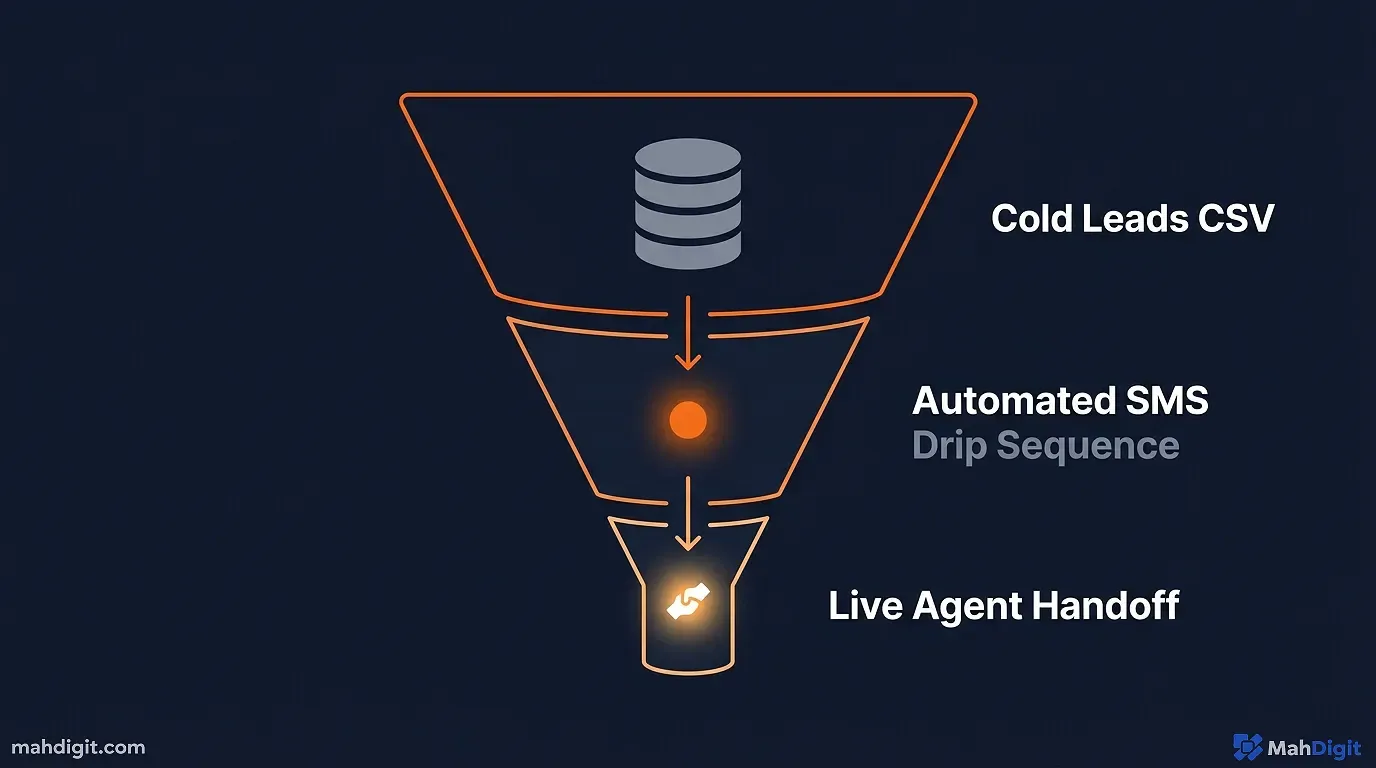
- The Ingestion: You take their CSV file of 1,000 dead leads, sanitize it to remove duplicates, and feed it into your PostgreSQL database.
- The Drip Campaign: Your n8n server initiates a customized SMS sequence over 30 days. Not email. Email open rates are abysmal. You use Twilio to send a simple text: “Hey [Name], we spoke last year about [Service]. Just checking in to see if you still needed help with that?”
- The Contextual AI: When a lead replies (e.g., “Yeah, I’m still looking for a house but interest rates scared me”), your server catches the webhook. It feeds the entire conversation history to your local AI model.
- The Handoff: The AI is prompted to act as an empathetic setter. It carries on a natural conversation, answering basic objections based on a FAQ you provided. The moment the lead expresses intent to book a call, the server immediately alerts the client via Slack or SMS to take over the live deal.
Why it works: You are taking an asset they considered worthless and turning it into cash. It requires zero upfront work from the client. To understand how to structure the initial customized personas for a system like this, refer to my AI Prompting Guide. I once resurrected a $40,000 roofing contract for a client simply by having my server text a lead who had gone silent six months prior. The client happily paid me my 10% cut.
Automation 3: Hyper-Niche Job Board Scraping
This one is slightly different. Instead of serving a local business, you are serving an entire industry.
The Hustle: You build a specialized job board (e.g., “Only Remote Rust Developer Jobs”) and monetize through paid company postings or affiliate links to resume optimization services.
How the Server Automation Works:
- The Crawl: Every night at 2 AM, your server runs aggressive scraping scripts. Apify provides excellent, cheap scraping blueprints if you do not want to write the Python yourself. You point it against general job boards, company career pages, and large LinkedIn feeds.
- The Filter: Raw scraping returns utter garbage. If you just scrape “Rust,” you get jobs on rust removal. You pipe the messy data through your local LLM.
- The Extraction Prompt:
Review this raw HTML job posting. Does it explicitly mention the Rust programming language as a core requirement? Is the role 100% remote within the US time zones? If yes, extract the exact salary range, the top 3 technical requirements, and write a punchy two-sentence summary of why a developer would want to work there. Output the data in valid JSON format.- The Publisher: If the job meets your strict criteria, n8n automatically formats the extracted JSON data and publishes it via API to your WordPress or Webflow site. It then auto-tweets the job link to your niche audience.
Why it works: You are providing large value by curating the noise of the internet. Because your server does the heavy filtering overnight while you sleep, you wake up to a freshly updated, specialized website that drives high-intent organic traffic. You can then sell premium placement spots to recruiters for $100 per post.
Automation 4: The B2B Content Repurposing Engine
Content marketing is exhausting for small B2B agencies. They might record a fantastic 45-minute podcast about supply chain logistics, but they lack the staff to chop it up for LinkedIn, Twitter, and their company blog.
The Hustle: You charge $500/month to turn their one piece of long-form audio/video content into a month’s worth of multi-platform text assets.
How the Server Automation Works:
- The Drop Box: The client drops an MP4 video file into a shared Google Drive folder.
- The Transcription: Your server detects the file, downloads it, and runs it through a local instance of Whisper (OpenAI’s open-source transcription model). Running Whisper locally is critical here; sending a 45-minute audio file to the cloud API costs real money. Locally, it just costs a few minutes of CPU processing.
- The Asset Generation: The server passes the large transcript to your local LLM with heavily structured, sequential prompts:
- “Extract the three most controversial, stand-alone quotes for Twitter. Under 280 characters each.”
- “Turn the segment between minute 12 and 18 into an engaging LinkedIn story post, formatted with line breaks and bullet points.”
- “Rewrite the core thesis of the entire transcript into an SEO-optimized 1,500-word blog post format, including H2 headings.”
- The Delivery: The server formats all these assets into a clean Notion document, tags the client, and sends a Slack alert marking the job as complete.
Why it works: You are essentially doing the work of a Junior Social Media Manager for a fraction of the cost, entirely executed by scripts running in a headless box under your desk. For a deeper dive into the specific tools needed to push content to platforms, see my guide on how to Automate Social Media with AI.
The Reality of Running Home Server Automations
It is important to understand that these systems are not a “set and forget” utopia. While the revenue generated can be considered passive once operational, the maintenance is not.
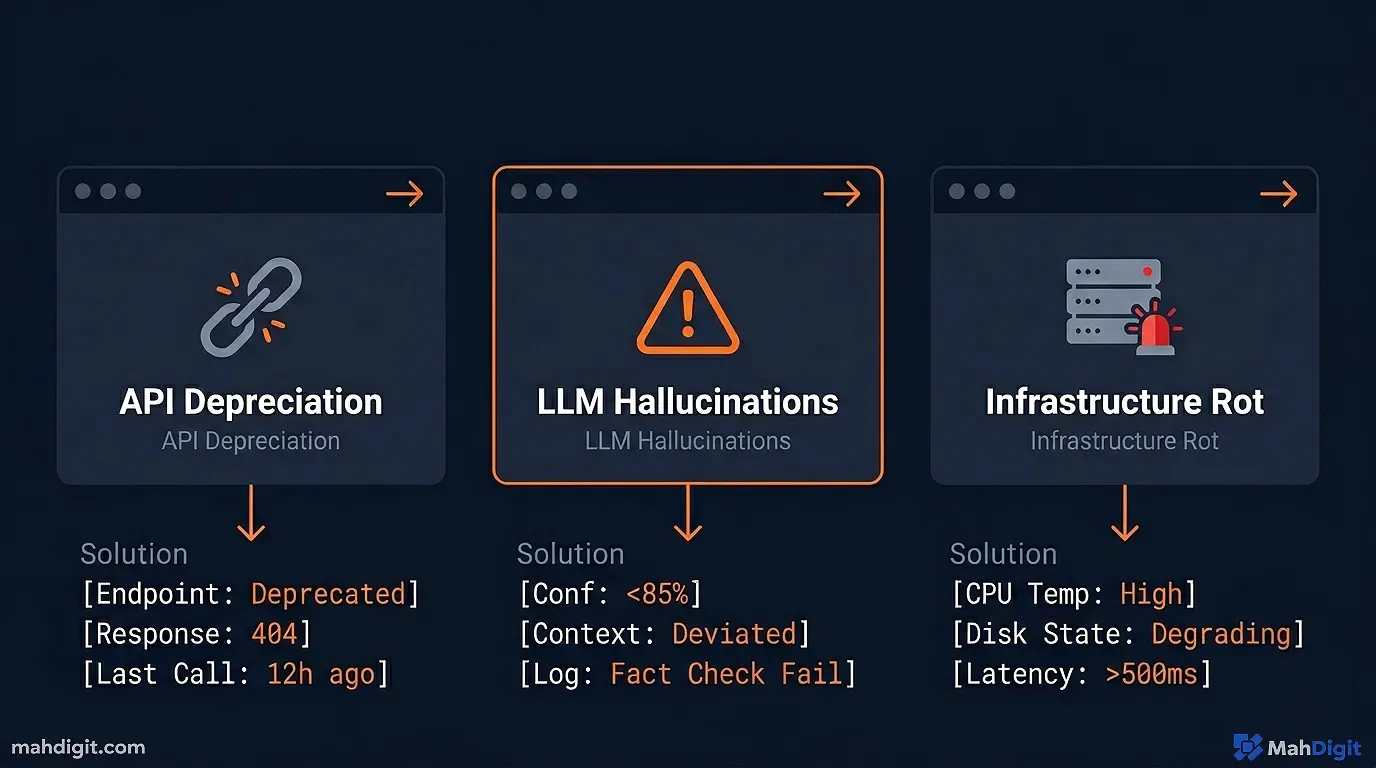
| Maintenance Reality | What Actually Happens | How I Fix It |
|---|---|---|
| API Depreciation | Google, LinkedIn, and Facebook change their API endpoints constantly without warning. Your n8n workflows will simply stop working overnight. | I use dedicated monitoring software like UptimeRobot to ping my critical webhooks. If an endpoint fails, I get a push notification immediately, so I can fix the JSON mapping before the client notices. |
| LLM Hallucinations | Sometimes, your local model will have a bad day and draft a response indicating your client’s business is permanently closed due to a misinterpretation of a review. | You MUST have robust error handling and human-in-the-loop approvals for critical client communications. Never let an AI send a negative email without your manual “Yes” button click. |
| Infrastructure Rot | Drives fail. Power goes out. A Docker container updates and breaks a dependency. | My Proxmox server automatically backs up my entire n8n and PostgreSQL environment to a cheap external hard drive every night at 3 AM. If the server dies, I can spin up the backup on my laptop in ten minutes. |
This technical friction is your competitive moat. The reason thousands of people sell AI coloring books is because it is easy. The reason very few people sell custom local server automations to plumbers is because it requires technical grit. The harder the problem is to solve, the higher the monthly retainer you can charge.
Key Takeaways
The most lucrative AI side hustles of 2026 are invisible to the consumer. They are B2B operational efficiencies running on self-hosted infrastructure.
- Avoid saturated consumer markets. Stop trying to sell AI art or generic ebooks. Focus on saving time and making money for local businesses.
- Self-host to control costs. Cloud API fees will destroy your margins at scale. A powerful home server running Proxmox, n8n, and local LLMs locks your operational costs at practically zero.
- Sell solutions, not tools. A dentist does not care about “Large Language Models.” They care about “Automatically replying to 5-star Google reviews.”
- Start with reputation management. Automating review responses is the lowest friction entry point for local B2B sales.
- Utilize raw transcripts for content generation. Charging retainers to run Whisper and LLMs against client audio is one of the highest margin services you can offer.
- Expect technical maintenance. You are the IT department for your digital workforce. APIs will break, and servers will need rebooting. The technical friction is what justifies your retainer fee.
Dust off that old PC in the garage, spin up an n8n instance, and start building digital employees. The businesses down your street are waiting for them. Once you have built an engine for one plumber, deploying it for a second plumber takes less than five minutes of cloning your n8n workflows. You are not trading hours for dollars; you are renting out infrastructure. To go further, explore building an AI workflow and our no-code AI automation guide to decide which orchestration platform fits your stack.
