Notion AI has been around long enough now that you can give it an honest assessment not based on the demo video, but on what it actually does when you use it in a real team on real work.
I’ve been using it on a team of six for just over four months: a mix of product, operations, and content people, all with different types of work and different expectations. Some people on our team weren’t impressed. One person uses it constantly. That spread tells you something useful about who this tool is actually for.
Here’s the full picture, without the promotional spin.
What Is Notion AI?
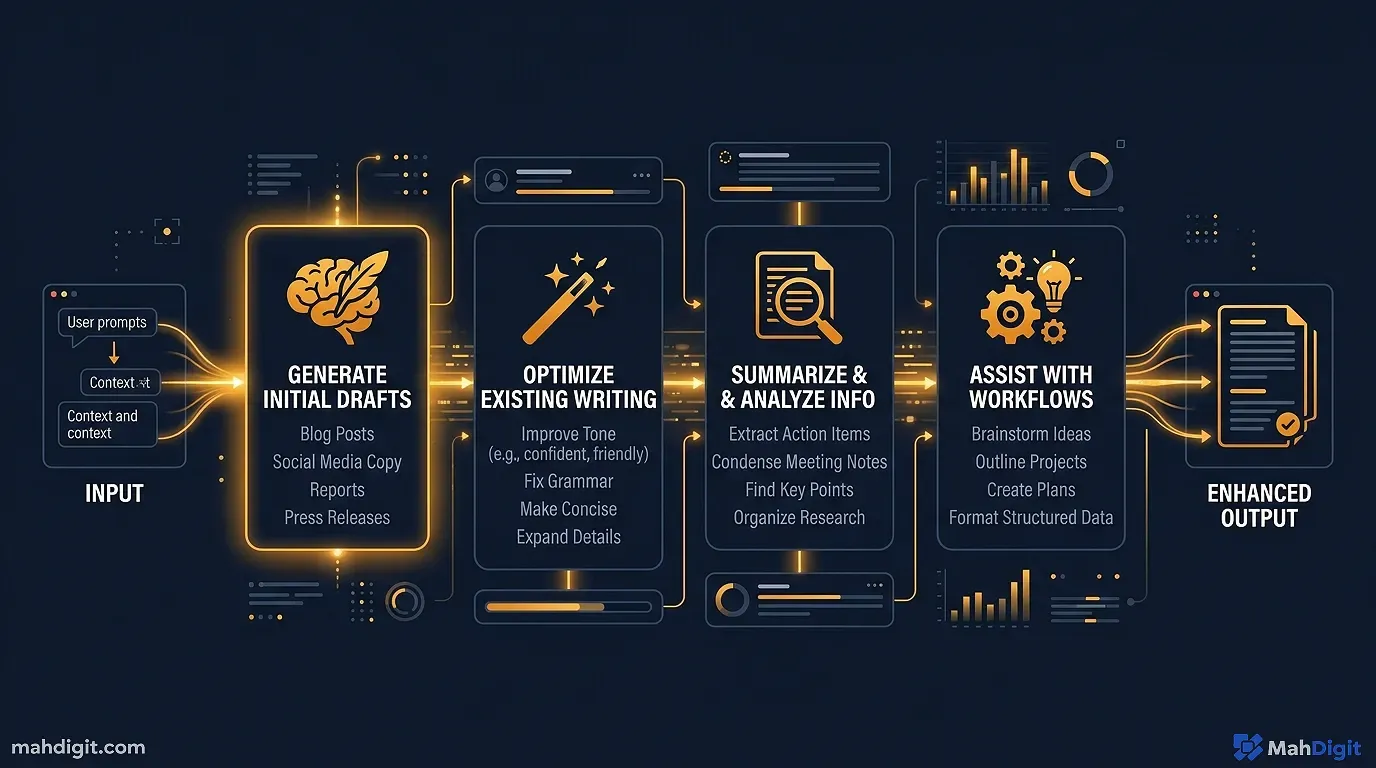
Notion AI is an AI assistant embedded directly in your Notion workspace. It’s not a separate app it lives inside Notion and can access and act on your existing pages, databases, and notes.
At the core, it’s a language model (based on similar technology to GPT-4) that can:
- Write first drafts, summaries, action items, and outlines
- Summarize any page or highlighted text
- Edit content for tone, clarity, or length
- Translate text into other languages
- Fill database fields based on existing page content
- Ask AI questions about the content in your workspace
The key differentiator from a standalone AI chatbot: it works within your existing documents and databases. You don’t copy-paste between tools.
Pricing The Honest Take
This is where Notion AI gets complicated, so I’ll be direct.
Notion AI is an add-on to your existing Notion plan. As of early 2026, it costs $8/month per member (billed annually) or $10/month billed monthly.
That means for my team of six, it adds $48/month to our Notion bill. On top of the Business plan we’re already on ($15/member/month), that pushes per-person cost to $23/month.
Compare that to buying Claude Pro or ChatGPT Plus as a standalone tool for $20/month per person except that one person can effectively handle tasks for the whole team if used properly.
The honest cost calculation: For teams already paying Notion Business or Enterprise rates, the per-user add-on cost accumulates fast. For a 10-person team, you’re looking at $80-100/month just for the AI features. That’s a budget conversation worth having before rolling it out company-wide.
For solo users and small teams (2-3 people), it’s easier to justify, especially if the features fit your specific workflow.
What Notion AI Does Well
1. Summarizing Long Pages
This is the feature I use most and the one that delivers the most consistent value. Paste or link to any long Notion page a meeting transcript, a strategy document, a research dump and ask Notion AI to summarize it.
The output is usually good on the first try: it captures the key points, identifies decisions, and skips the filler. For meeting notes in particular, this has replaced a step that used to take our team 15-20 minutes per session.
Fair warning: for very long documents (50+ pages), it sometimes misses detail in the second half. For those, I break the document into sections and summarize each part separately.
2. Meeting Notes Action Items
Type or paste a rough set of meeting notes and ask Notion AI to extract action items. This has become a standard step in our team’s meeting culture. Someone captures rough notes during the call; Notion AI turns them into a structured list with owners and deadlines.
The output isn’t always perfect about 20% of the time, I adjust the action item wording or consolidate two related items into one. But 80% of the time, it’s good enough to share directly.
3. First Drafts of Internal Documents
Project briefs, internal announcements, process documentation, team retrospective summaries anything that follows a predictable structure that you do repeatedly. Notion AI handles these well when given enough context.
Our operations lead uses it for onboarding documentation. She gives it a rough outline and the key points she wants covered; it produces a first draft in a consistent format that she then personalizes. She estimates it saves her about an hour per document.
4. Database Property Filling (Auto-Fill)
This is genuinely clever. For pages in a database, you can configure Notion AI to auto-fill certain properties based on the page content. For example: summarize a project page into a one-sentence description, or extract the project status from the body text.
Once configured, this runs automatically as you create new pages. The setup takes about 10 minutes and then saves dozens of manual metadata entries over time.
Where Notion AI Falls Short
1. Complex Writing Tasks
For anything requiring more than a few hundred words of quality prose a client proposal, a public blog post, a detailed analysis Notion AI is noticeably weaker than Claude or ChatGPT. The writing is competent but generic; it lacks the depth and voice that you get from a dedicated writing model.
I’ve found myself starting in Notion AI for speed, then moving the draft to Claude for refinement. Which raises the question: why not just write it in Claude from the start?
2. No Current Information
Notion AI’s knowledge has a training cutoff. For anything involving recent tool pricing, current events, or newly released features, it’s unreliable. For this, I still use Perplexity see our Perplexity AI review for the detail on why it handles current information better.
3. Context Is Limited to Notion
If your workflow spans multiple tools and most workflows do Notion AI can only work on what’s in Notion. It doesn’t know about your email threads, Slack messages, or documents in Google Drive. If your team’s information is spread across tools, this limitation matters.
4. Occasional Inaccuracies
Like all AI tools, Notion AI can confidently generate incorrect information. On two occasions over four months, it produced action items that attributed the wrong owner, or summarized a decision in a way that subtly misrepresented what was agreed. Both were caught in review but they underline the rule: don’t publish or act on Notion AI output without reading it.
Notion AI vs. Using ChatGPT or Claude in Notion
Many people find a middle ground: they keep Notion as their workspace, but use ChatGPT or Claude in a separate browser tab for AI tasks, then paste outputs back into Notion.
Notion AI wins when:
- You want AI directly inside a document without switching tools
- The task is quick (summarize this page, generate action items from these notes)
- Your team uses Notion as the single source of truth and everyone needs access
External AI (Claude, ChatGPT) wins when:
- Writing quality is important (client-facing documents, public content)
- You need long-form generation beyond a few paragraphs
- You can’t justify the additional $8/member/month
- The task requires current or verified information
I use both, depending on the task. For anything under 300 words that’s staying internal, Notion AI is faster because I don’t leave the app. For anything that represents us externally, Claude wins on quality.
Who Should Pay for Notion AI?
Yes, pay for it if:
- Your team already lives in Notion and does regular writing within it
- Meeting note processing is a significant time drain on your team
- You want database property auto-fill to handle repetitive metadata
- The workflow integration value outweighs the cost ($8/member/month)
Skip it if:
- You use Notion mainly as a database or project tracker with minimal writing
- Your team writes in Google Docs or other external tools
- You’re a solo user at $8/month it’s reasonable, but ChatGPT Plus ($20) does more
- You’re budget-conscious the cost adds up fast on larger teams
Common Mistakes With Notion AI
Using it without review. The output sounds confident. It can still be wrong. Read everything before sharing it with a team.
Expecting it to match Claude or GPT-4 on writing quality. Notion AI is optimized for the Notion use case quick, embedded tasks. For serious long-form work, a dedicated writing AI is better.
Turning it on for everyone without a use case. We made this mistake early. We enabled it for the full team before identifying which tasks would actually use it. Two people used it daily; four used it sporadically. Identify the specific use cases before paying for the full team.
Key Takeaways
Notion AI is genuinely useful for the right team in the right context. It’s not the most powerful AI writing tool, but it’s the most integrated one if Notion is your workspace.
- Best for: meeting summaries, action items, short internal drafts, database auto-fill
- Not great for: quality long-form writing, current information, cross-tool workflows
- Pricing: $8/member/month is reasonable for small teams, expensive for large ones
- Honest verdict: solid add-on if Notion is your primary team workspace; hard to justify otherwise
Related Articles
- Claude AI Review 2026: The Best AI for Writing?
- Getting Started with ChatGPT: A Practical First-Week Guide
- Grammarly AI Review 2026: Beyond Grammar Checking
- No-Code AI Automation: Build Workflows Without a Developer
What’s Next
- If you want to compare Notion AI to a dedicated AI assistant, see our ChatGPT vs Claude vs Gemini comparison
- Building a full AI productivity system around Notion? Our guide to building AI workflows covers how to connect tools into a real automation pipeline
- For the complete landscape of tools including how Notion AI fits in, see 10 Best AI Tools for Productivity in 2026
External Resources
- Notion AI Official Feature Overview official breakdown of what Notion AI can do and how add-on pricing works
