For the last three years, we have all been “prompt engineers.” We sat in front of a chat window, typed out a request, waited for the AI to spit out an answer, and then manually copied that answer into another program. We were the human API connecting the AI to the real world. I used to spend two hours every morning asking ChatGPT to summarize industry news and then pasting those summaries into a Notion doc for my team. It felt advanced in 2023, but looking back, I was just doing digital data entry.
In 2026, the era of large manual prompting is over. We have entered the era of the Autonomous Agent.
An agent does not wait for you to feed it every single instruction. Give an agent a high-level goal, and it will break that goal down into individual steps, use digital tools to execute those steps, and correct itself if it makes a mistake along the way.
If this sounds like science fiction that requires a Ph.D. in machine learning to build, I promise you it is not. The tooling has evolved dramatically. You can build a functioning, autonomous AI agent this afternoon without writing a single line of Python. Here is the exact, step-by-step, no-code blueprint I use to train my own digital employees.
What Is an “Agent”? The 4 Core Components
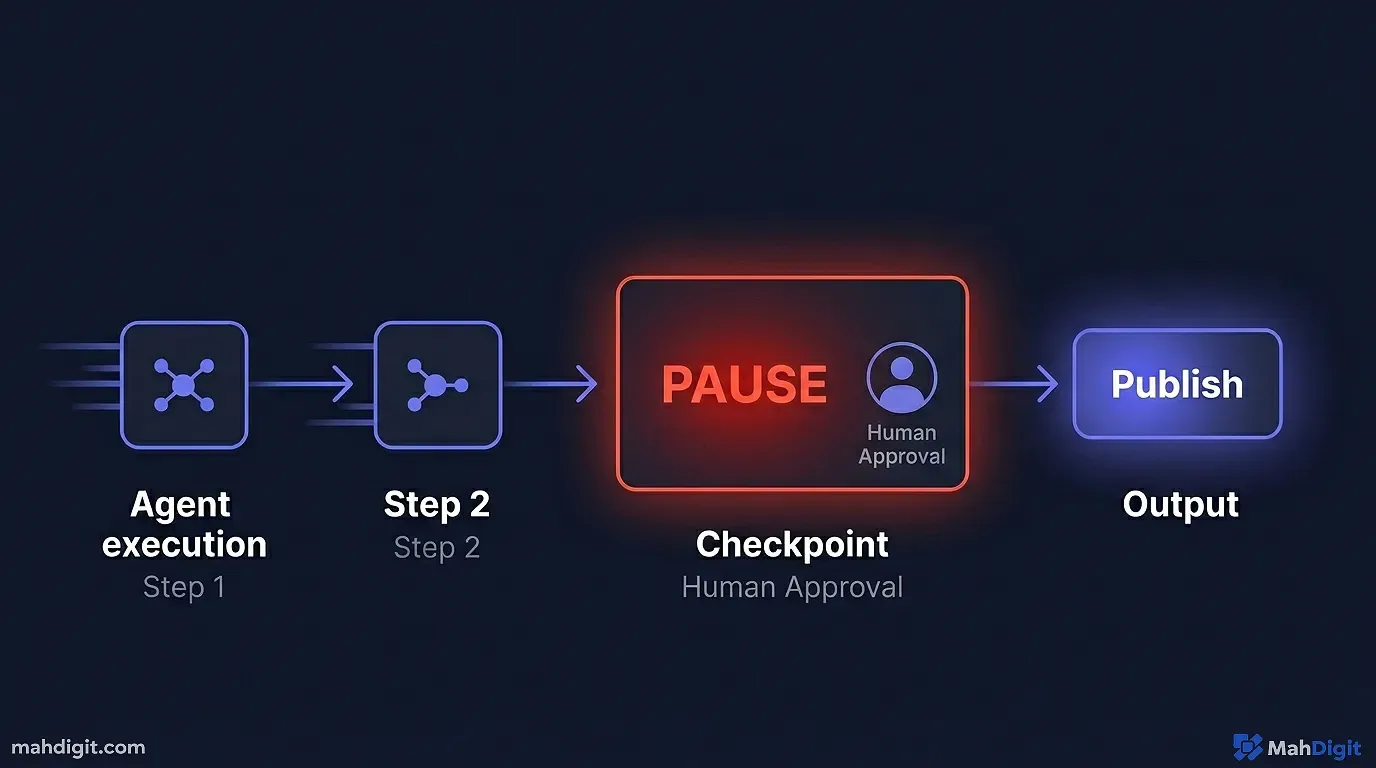
Before we build one, we need to understand the anatomy of an agent. A standard Large Language Model (like ChatGPT) is just a brain locked in a jar. It knows a large amount of information up to its training cutoff date, but it cannot actually do anything. It cannot click a button, it cannot read today’s stock prices, and it cannot send an email.
An autonomous agent gives that brain eyes, ears, and hands. To function, it requires four core components:
- The Brain (LLM): The core intelligence (e.g., GPT-4o, Claude 3.5 Sonnet, Llama 3) that understands human language, reasons through complex problems, and makes logical decisions.
- The Tools (Hands): APIs and integrations that allow the brain to interact with the real world. This could be a tool to scrape a live Google search, a tool to authenticate into your Gmail to send an email, or a tool to write data to an Airtable base.
- The Memory (Hippocampus): A persistent database (like a Pinecone vector database or even a standard text log) that allows the agent to remember what happened five minutes ago, or what happened with a specific client last month. Without memory, an agent is a goldfish, treating every interaction like the first time.
- The Control Loop (The Manager): The orchestration system that dictates the workflow. It asks: “What is my overarching goal? What tool should I use first? Did that tool return the expected data? If no, what is the fallback plan? If yes, what is the next step?”
If you want a deeper dive into evaluating the specific AI models that serve as the best “brains” for different types of agency tasks, review my technical comparison in ChatGPT vs Claude vs Gemini.
Step 1: Choosing Your No-Code Platform
You cannot build an autonomous agent in a standard consumer chat window. You need an orchestration platform. These platforms provide the visual, drag-and-drop interface where you securely connect the AI brain to the API tools.
While enterprise companies use complex, code-heavy frameworks like LangChain or AutoGen, solo builders and small businesses in 2026 are using visual builders.
| Platform | Best Use Case | The Learning Curve | The Cost Structure |
|---|---|---|---|
| Zapier Central | Absolute beginners who need instant access to thousands of apps. | Low. If you can use basic Zapier, you can build an agent. | High at scale. Task limits burn quickly. |
| n8n (Self-Hosted) | Developers and technical operators building complex, multi-step loops. | Steep. Requires understanding JSON and API structures. | Almost free if self-hosted via Docker. |
| Make (Integromat) | Intermediate users who want visual branching logic without coding. | Moderate. The visual interface is intuitive but managing data arrays is tricky. | Medium. Cheaper than Zapier, easier than n8n. |
| MindStudio / Lindy.ai | Building dedicated, customer-facing AI applications with memory. | Moderate. UI is built specifically for agent design. | Subscription-based, scalable. |
For this tutorial, we will use the mental model of Zapier Central or a platform like Lindy.ai, as they offer the absolute lowest barrier to entry for a first-time build. (For a broad guide on no-code tools, read my breakdown: no-code AI automation guide).
Step 2: Defining the “Agent Objective”
The biggest mistake beginners make is giving an agent a large, ambiguous goal. If you tell an agent, “Make me a viral marketing campaign,” the agent will freeze, hallucinate a bunch of generic buzzwords, and fail completely.
You must define a narrow, specific, quantifiable objective. I treat my new agents like literal-minded interns on their first day of work.
Our Project: We are going to build the “Competitor Watchdog Agent.”
- The Goal: Every Friday at 5 PM EST, research three specific competitor websites, summarize any new product announcements or pricing changes on their landing pages, and send a formatted, bulleted brief to our
#competitive-intelSlack channel.
This objective is perfect. It is exceptionally clear, it requires specific external tools (live web browsing, Slack API), and it runs autonomously on a fixed schedule.
Step 3: Writing the “System Prompt” (The Instructions)
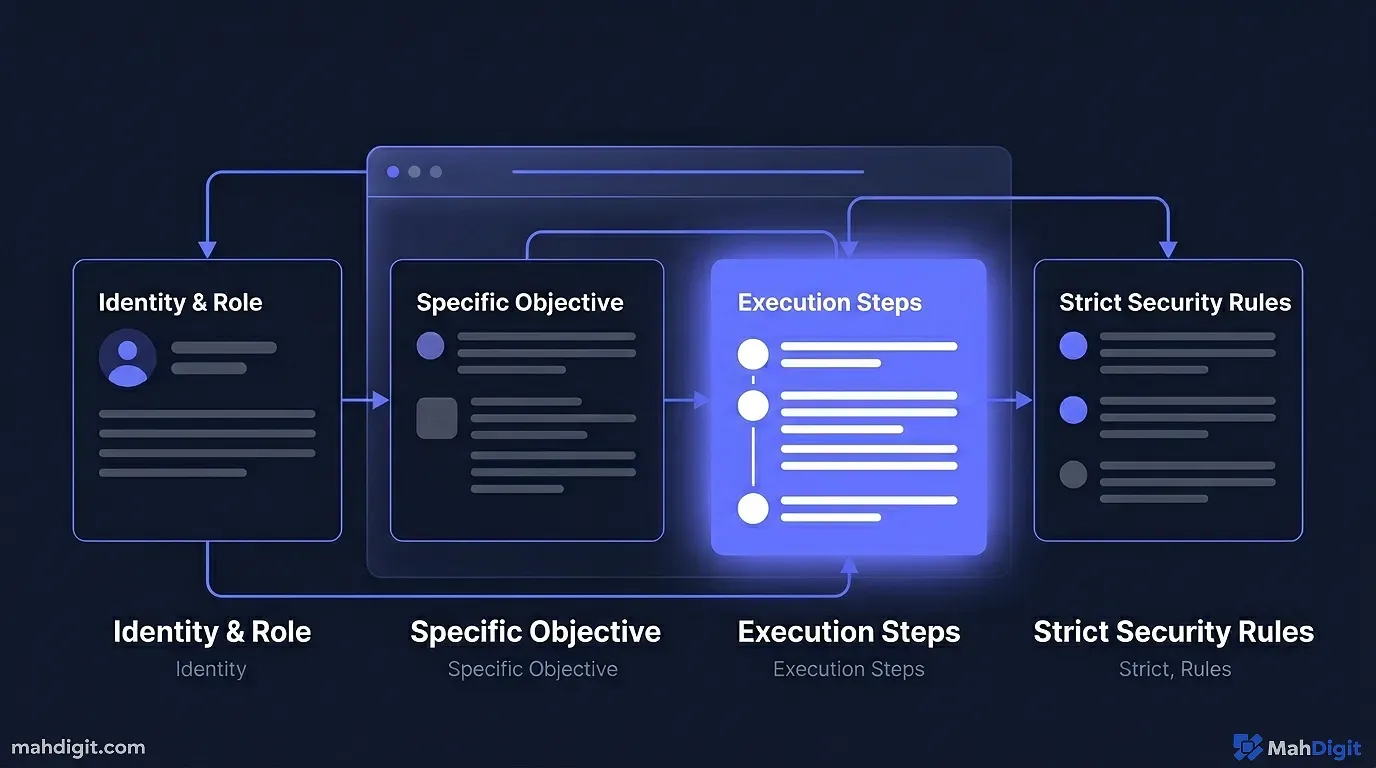
In an agent-builder platform, you do not just type a quick request; you write a “System Prompt.” This is the core identity and the rigid set of rules the agent must never break. Do not rush this step. An agent without strict operational rules is a large liability.
Here is the exact framework I use for the Watchdog Agent. I structure it like a Standard Operating Procedure (SOP) document:
**Role:**
You are the Lead Competitive Intelligence Analyst for Mirza Automation Labs. You are precise, analytical, and obsessed with accuracy.

**Objective:**
Your weekly objective is to monitor the following three URLs for any changes in their pricing tiers or new feature announcements on their main blog:
1. https://competitor-one.com/pricing
2. https://competitor-two.com/blog
3. https://competitor-three.com/updates

**Execution Instructions:**
1. Use your Web Search Tool to navigate to the specific URLs provided above. Do not search Google; go directly to the URLs.
2. Read the raw text content and compare it against your memory of last week's findings.
3. If there are NO changes detected on any site, you must output : "No competitor changes detected this week. Operations normal."
4. If there ARE changes detected, synthesize them into a concise, 3-bullet-point summary. Include the specific new price or the name of the new feature.
5. Use your Slack Tool to post that synthesized summary, formatting it clearly with bold headers for each competitor.

**Strict Security Restrictions:**
Never hallucinate pricing data. If a webpage returns a 404 error or fails to load, report the error immediately in the Slack channel. Do not guess or infer data that is not explicitly written on the page.
By setting strict constraints (“Do not search Google; go directly to the URLs” and “Do not guess”), we actively prevent the agent from getting distracted by a Wikipedia page or inventing fake pricing data when a competitor’s website goes down for maintenance.
Step 4: Equipping the “Tools” (The Hands)
Now that the agent knows what to do and how to act, it needs the ability to actually execute the instructions. In your no-code platform, you will see an “Add Tools” or “Add Integrations” button attached directly to your agent profile.
For our Watchdog Agent, we need to click “Add Tool” and authorize two specific API connections:
- A Web Browsing/Scraping Tool: (e.g., Browserless, Apify, or a built-in search tool within Zapier). This allows the agent to bypass the LLM’s historical knowledge cutoff date and read live, rendered websites as they appear today.
- Slack Integration: You will log into your Slack workspace through the platform’s OAuth window and explicitly authorize the agent to post messages into one specific channel (e.g.,
#competitive-intel).
This is the magic of 2026 no-code architecture. Five years ago, connecting those tools required setting up an AWS server, configuring OAuth 2.0 flows, and writing messy REST API calls in Python. Today, it is clicking a button that says “Allow Access.”
Step 5: Setting the “Trigger” (The Alarm Clock)
An autonomous agent needs a reason to wake up and start working. It cannot just run continuously in an infinite loop (which would bankrupt you in OpenAI API costs within an hour).
In the builder interface, you configure the “Trigger.”
- Trigger Type: Schedule / CRON Job.
- Parameters: Every Friday at 5 PM EST.
When the server clock strikes 5
PM, the orchestration platform pings the agent. The agent wakes up, reads its system prompt instructions, picks up its web-scraping tools, navigates to the three URLs, processes the data, and sends the Slack message all while you are driving home from the office. You never opened your laptop.The “Human-in-the-Loop” Safety Net
I cannot stress this architectural principle enough: Never let a newly built agent execute critical or client-facing tasks without supervision.
If you build an agent to automatically reply to customer support pricing inquiries, do not let it send emails immediately. What if the LLM provider updates its model weights overnight, and your agent hallucinates and suddenly starts offering everyone a 90% discount? You will be financially ruined in a weekend. I know an agency owner who lost a $10,000 contract because an unchecked agent sent a large, hallucinated legal threat to a client over a simple billing question.
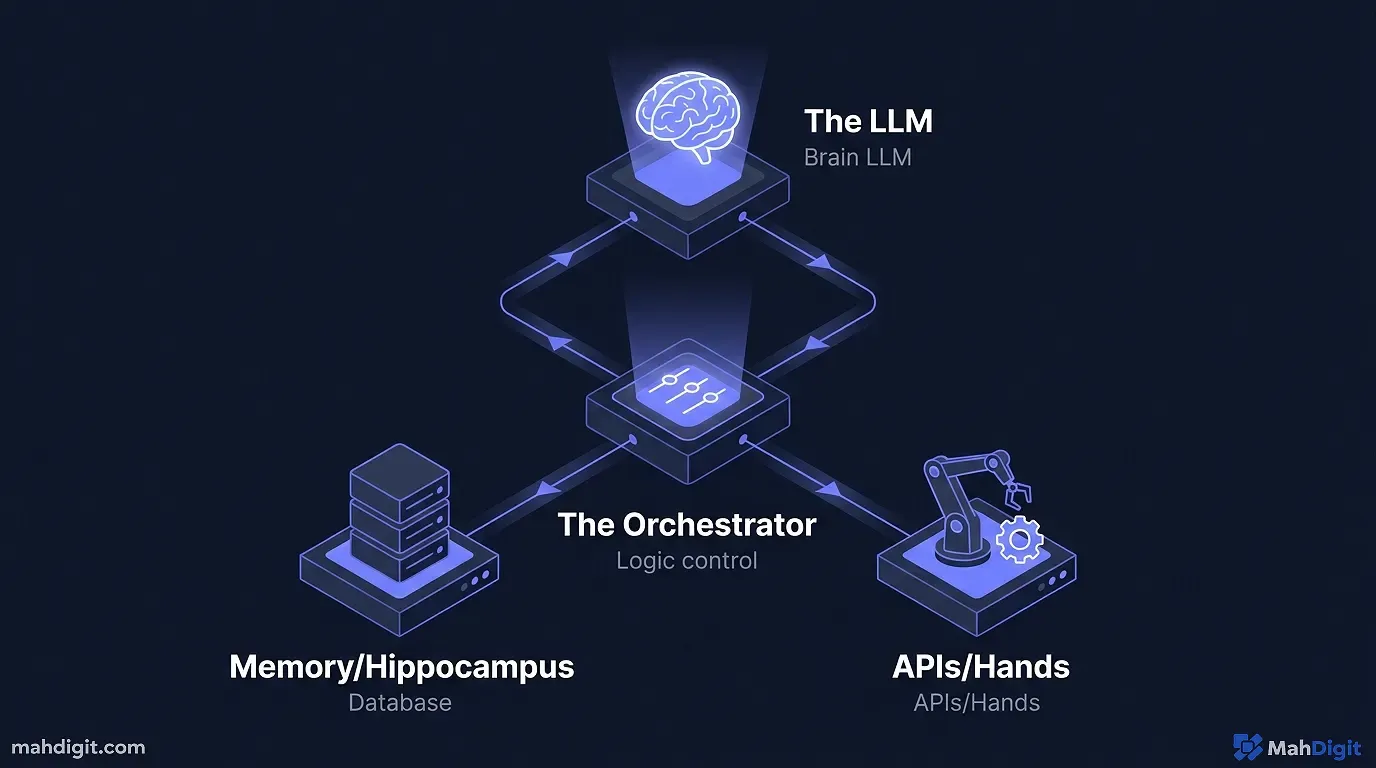
Always implement a “Human-in-the-Loop” (HITL) step during the first month of deployment.
In your orchestration platform, add a manual approval step right before the final execution action (sending the Slack message, posting the tweet, or sending the email).
- Action: Send Draft to Manager (You) via Slack or Email.
- Condition: Pause Workflow. Wait for human “Approve” button click.
With this safety net, the agent still does 99% of the heavy lifting. It researches, it formats, it sanitizes data, and it drafts the response. You spend five seconds reviewing the draft and clicking “Approve.” Once the agent proves it is reliable over 50 consecutive successful iterations, you can confidently remove the HITL safety net and let it fly fully autonomously.
Step 6: Advanced Error Handling (The Mark of a Pro)
Beginners build agents that work well when everything goes right. Professionals build agents that know what to do when everything goes wrong. And in the world of web automation, things constantly go wrong.
Let us return to our Competitor Watchdog Agent. What happens if competitor-two.com completely redesigns their website on Thursday night, and the URL /blog now redirects to a broken 404 page?
If you did not build in error handling, the agent’s web scraper tool will return HTML that says “Page Not Found.” The LLM, trying its best to fulfill your prompt, might summarize the 404 page, or worse, it might hallucinate old information it remembers from its training data just to give you an answer. You wake up on Friday to a Slack message containing completely fabricated pricing data.
The Try/Catch Mental Model
In traditional programming, there is a concept called try/catch. You try to do an action, and if it fails, you catch the error and do something else instead of crashing the whole program. You must build this logic into your no-code agents.
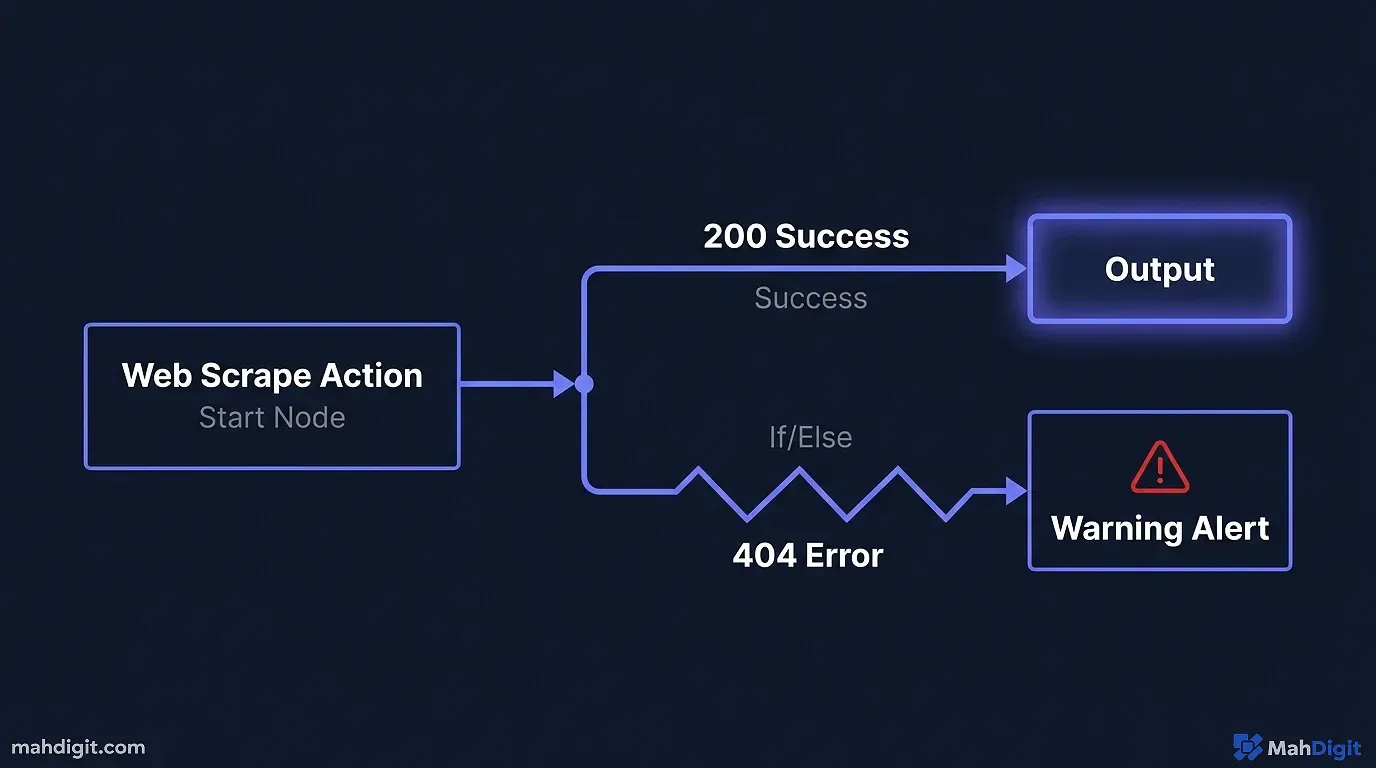
In platforms like n8n or Make, you implement this visually with conditional routing (an “If/Else” node).
- The Primary Action: The agent tries to scrape the URL.
- The Condition Check: An IF node immediately checks the status code of that scrape. Did the website return a
200 OKstatus, or did it return a404 Not Foundor500 Server Error? - The Safe Route: If it returned
200 OK, the workflow proceeds normally. The LLM summarizes the data and prepares the Slack message. - The Error Route: If it returned an error code, the workflow splits onto a different path. It completely bypasses the LLM summarization step. Instead, it triggers a separate action that sends an urgent DM to your Slack: “CRITICAL: Watchdog Agent failed to read Competitor Two. The server returned a 404 error. Manual intervention required to update the target URL.”
By building this simple fork in the road, you guarantee that your agent will never silently feed you garbage data. It will either succeed well, or it will loudly announce why it failed.
This strict approach to data hygiene is identical to the philosophy I wrote about in AI prompting guide. If the data is not 100% verified, it does not get published.
The Economics of Agents (Managing API Costs)
When you start building agents, you are paying for two distinct things: “Tokens” (the raw text processing power of the LLM) and “Executions” (the server cost of the orchestration tool running).
An autonomous agent uses significantly more tokens than a standard chat window interaction because it “thinks” out loud. It looks at a webpage, summarizes the HTML, evaluates if it needs more info, searches again, and synthesizes the final output. This iterative looping consumes tokens incredibly rapidly.
If you are using GPT-4o or Claude 3.5 Sonnet to run simple, repetitive web scraping tasks, you are burning money unnecessarily. The architectural secret of scaling in 2026 is routing easy, deterministic tasks to cheap, incredibly fast models (like Llama 3 8B or GPT-4o-mini) and only calling the expensive, heavy models for complex reasoning or nuanced writing.
If you are serious about keeping your server costs down while deploying a fleet of these digital workers, I strongly suggest reviewing my overall strategic blueprint in AI for Small Business regarding model allocation.
Key Takeaways
Building an autonomous agent is no longer a coding challenge; it is a systems architecture challenge. It is about defining clear operational goals and equipping the AI with the right digital tools to execute them.
- Agents need clear, rigid boundaries. Do not give an agent a vague, creative objective. Treat it like a literal-minded intern on day one. Give it step-by-step logic restrictions and negative constraints.
- Pick the right no-code platform. Zapier Central is easiest for raw beginners, n8n is the best for managing complex logic and costs at scale, and dedicated platforms like Lindy are built specifically for persistent agent memory.
- Tools change everything. An LLM on its own is a fun novelty. An LLM equipped with live web scraping, database write-access, and communication APIs is a hyper-efficient digital employee.
- Always use Human-in-the-Loop initially. Never trust a new agent to execute client-facing or financial actions without manual approval during the testing phase. Your reputation is on the line.
- Watch your API costs like a hawk. Agents “think” in iterative loops. Use cheaper, lightweight models (like Llama 3 or 4o-mini) for simple data extraction to prevent your API bills from exploding.
You just built your first autonomous agent. You are no longer trading your limited time to execute repetitive digital tasks. You have built a machine that executes them for you. Ready to go further? Explore building an AI workflow and automating social media with AI to see how agents power an entire business.
