Your coworker uses ChatGPT to write reports. Your kid generates artwork with AI tools. Your boss just sent a company-wide email about an “AI strategy.” And you’re sitting there wondering: what actually is AI? What’s actually happening when you type something into ChatGPT and it answers you?
You’re not alone. Most people using AI tools every day couldn’t explain how they work if asked. And here’s the thing you don’t need a deep technical understanding to use these tools well. But a basic mental model helps enormously. It prevents you from expecting things AI can’t do and helps you understand why it sometimes confidently says things that are completely wrong.
So: no jargon. No neural network diagrams. Just a clear explanation of what AI actually is, what it can and can’t do, and how to start using it productively.
AI in 60 Seconds
Let’s start with the simplest possible version.
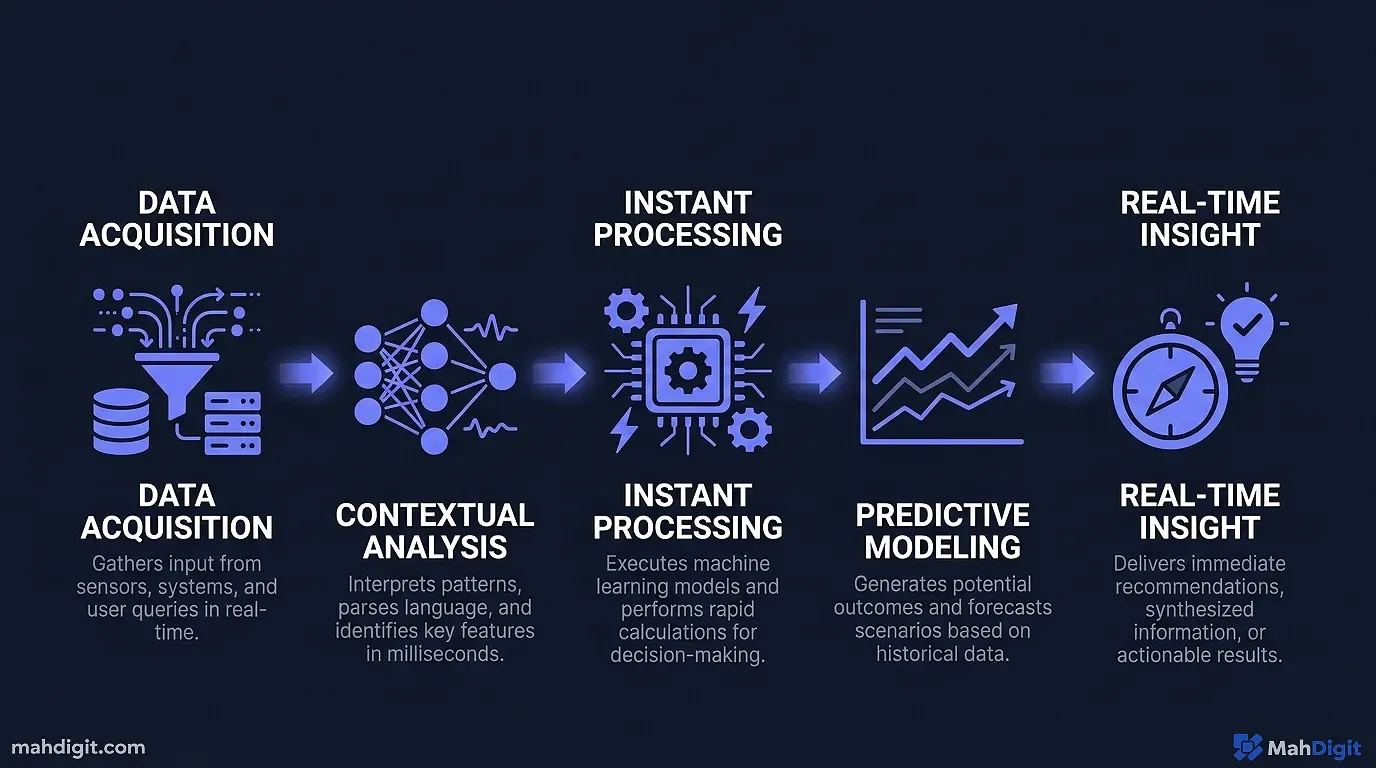
AI at least the kind most of us encounter day-to-day is pattern recognition at large scale. It’s software trained on enormous amounts of data (text, images, code, etc.) that learned to recognize patterns in that data and generate responses that fit those patterns.
That’s it. There’s no thinking happening in the way humans think. There’s no understanding, no feelings, and definitely no sentience. When ChatGPT answers your question, it’s not reasoning through the problem the way a person would it’s generating text that statistically fits what a good answer would look like, based on everything it was trained on.
This matters because it explains both why AI is impressive (it’s seen so much data it can “sound like” a brilliant expert in almost any field) and why it sometimes fails badly (it can generate confident-sounding nonsense if the pattern fits, even when the content is wrong).
The Three Types of AI You’ll Actually Encounter
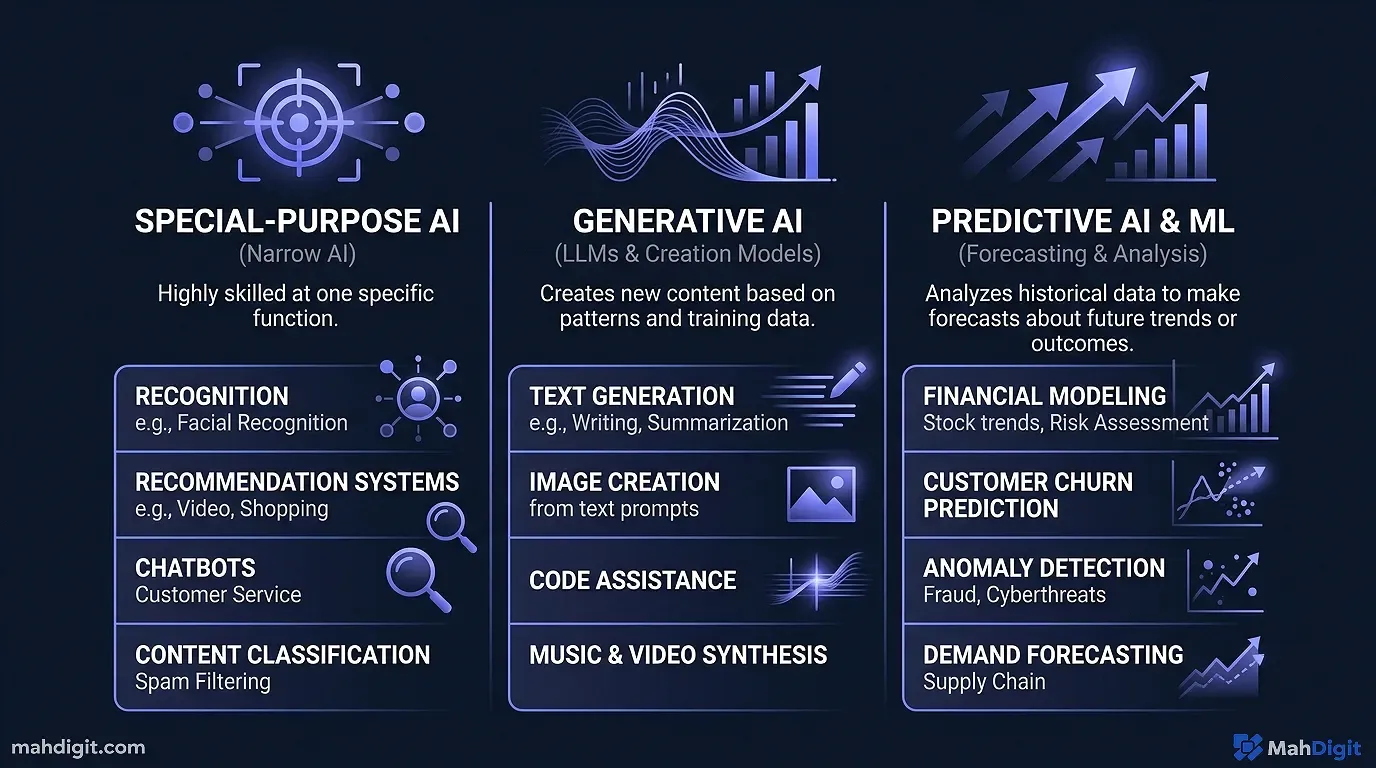
Not all AI works the same way. The tools you’ll encounter in your daily work fall into three rough categories:
1. Language Models (ChatGPT, Claude, Gemini)
These are text-in, text-out AI systems. They’re trained on huge amounts of written text books, websites, academic papers, code and learned to predict and generate language.
When you type a question, the model generates a response one word (technically one “token”) at a time, each word chosen based on what would most likely come next given all the context. The result often sounds remarkably coherent and knowledgeable because the model has absorbed patterns from genuinely knowledgeable writing.
These tools are best for: writing, summarizing, brainstorming, answering questions, analyzing text, explaining concepts.
2. Image Generators (DALL-E, Midjourney, Stable Diffusion)
These work on the same general principle but with images instead of text. Trained on millions of images with labels, they learned to generate images that match described patterns.
You describe what you want (“a photograph of a dog wearing sunglasses on a beach at sunset”), and the model generates an image that fits. The results can be stunning or bizarre, and they get better the more specific your description is.
3. Embedded AI Assistants (Grammarly, Copilot, Notion AI)
These are AI capabilities built directly into tools you already use. Grammarly suggests edits as you write. GitHub Copilot suggests code as you type. Notion AI summarizes your notes on demand. Microsoft Copilot in Word helps you draft documents.
The underlying technology is usually a language model (often GPT-4 or similar), but it’s presented in a way that’s integrated into your existing workflow. These are often the easiest entry point for people who aren’t ready to experiment with a standalone AI chatbot.
How ChatGPT Actually Works
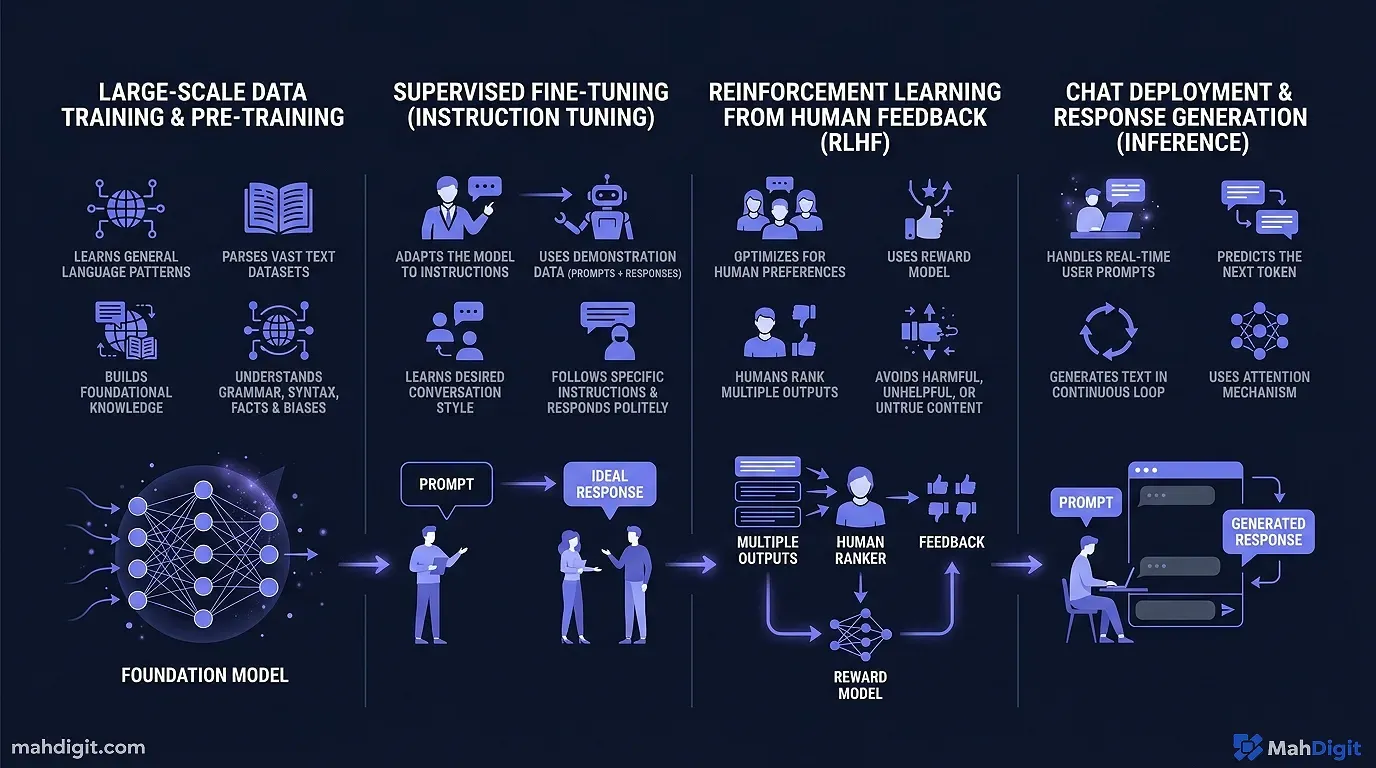
Since ChatGPT is what most people encounter first, it’s worth understanding what’s happening under the hood in plain terms.
Training: Learning From the Internet (and More)
OpenAI trained ChatGPT on a large dataset of text from the internet, books, academic papers, and other sources. The training process exposed the model to billions of examples of text and taught it to predict what text would naturally follow any given input.
The model has billions of “parameters” values that were adjusted during training to make the predictions more accurate. These parameters are essentially the model’s “learned knowledge” patterns extracted from all the text it processed.
At Inference: Predicting the Next Word
When you type a message, ChatGPT doesn’t look up an answer in a database. It generates a response by predicting, step by step, what text should come next based on your input and everything it learned during training.
Each word it generates becomes part of the context for predicting the next word. That’s why conversations feel coherent each token is generated with awareness of what came before it in the same conversation.
Why This Causes Hallucinations
Here’s the critical insight: the model is optimized to generate text that sounds right, not text that is right. When it doesn’t know something, it doesn’t say “I don’t know” it generates text that sounds like a plausible answer.
This is why ChatGPT will sometimes confidently give you a wrong statistic, invent a citation, or describe a feature that doesn’t exist in a software tool. From its perspective, it’s just generating the kind of text that would follow your question. That text happens to be wrong, but the model doesn’t know the difference.
This isn’t a bug that will be “fixed” it’s a fundamental property of how language models work. The practical implication: always verify important claims, especially facts, numbers, and citations.
What AI Can and Can’t Do
This is where most people’s expectations diverge from reality.
What AI Is Genuinely Good At
Processing and summarizing large amounts of text. Give it a 50-page report and ask for the five most important conclusions. A task that would take a person an hour might take ChatGPT 30 seconds.
Generating drafts, templates, and options. First drafts of emails, blog posts, proposals, meeting agendas. It won’t always hit what you want, but it gives you a starting point that’s faster to edit than to write from scratch.
Explaining complex concepts. Ask it to explain quantum computing or double-entry bookkeeping “like I’m a high school student.” It adjusts its language and uses analogies in a way that’s genuinely helpful.
Writing code. For common programming tasks in popular languages, AI tools can generate working code surprisingly reliably. This has changed software development not by replacing developers, but by eliminating large amounts of boilerplate and lookup work.
Brainstorming and expanding ideas. “Give me 20 different angles for this blog post” or “what are 10 objections a customer might raise to this proposal?” It generates options faster than you can, and some of them will be genuinely useful.
What AI Gets Wrong Reliably
Current events and recent information. Most language models have a training cutoff. Ask about something that happened after that cutoff and you’ll get either a refusal or a hallucinated answer.
Precise facts, statistics, and citations. It will confidently give you statistics that sound plausible but are inaccurate. Always verify any specific numbers before using them in anything important.
Original thinking. AI recombines existing patterns it can’t form a genuinely new insight that wasn’t implicit in its training data. It can be creative within patterns, but not outside them.
Judgment calls in complex situations. Should you fire this employee? Is this business strategy right for your specific market? The nuance and context required for these decisions is beyond what AI can reliably handle.
AI Myths vs. Reality
There’s a lot of noise around AI. Here’s a quick reality check on the most common claims:
“AI will take everyone’s jobs.” Some jobs will change significantly. Many tasks within jobs will be automated. But most knowledge work involves judgment, relationships, and context that AI handles poorly. The more realistic near-term story: people who use AI effectively will outcompete people who don’t.
“AI is always right.” As covered above no. AI generates plausible-sounding text, not verified truth. Trust but verify.
“AI understands what you’re saying.” It processes and responds to language in ways that look like understanding. But there’s no comprehension happening in the way a human understands something. It’s pattern matching, not cognition.
“The AI is spying on me.” Your conversations with AI tools are typically used for improving the models (though you can opt out in settings). They’re not being read by humans in real time. That said, don’t send genuinely sensitive information personal financial data, confidential client work, passwords to any AI service.
“The free tier is useless.” Not true. ChatGPT’s free tier with GPT-4o mini handles most everyday tasks well. The paid tiers unlock more capability, but the free versions are a legitimate starting point.
Getting Started: Your First 30 Minutes with AI
Theory is useful, but experience is better. Here’s what to try in your first session:
Step 1 (5 min): Go to chat.openai.com and create a free account. No credit card needed.
Step 2 (5 min): Type this prompt: “I need to write a professional thank-you email to a client after a meeting where we discussed [your project]. Keep it short, warm, and specific.” Fill in your actual project. Read the output.
Step 3 (5 min): Reply with a follow-up: “Make the second paragraph shorter, and add a specific mention of the timeline we discussed.” Notice how it updates based on your feedback.
Step 4 (10 min): Try a summarization task. Paste a long email thread or document (nothing confidential) and ask: “Summarize the key decisions and action items from this, in bullet points.”
Step 5 (5 min): Ask it to explain something you’ve always found confusing from your field something technical or conceptual. Use the prompt: “Explain [concept] in simple terms, using an analogy.”
After 30 minutes, you’ll have a much better feel for what it’s actually like to use. Theory only gets you so far.
Common Mistakes Beginners Make
Asking questions that are too vague. “Help me with my business” gives you a generic answer. “Help me draft a one-paragraph pitch for my freelance copywriting service targeting e-commerce brands” gives you something useful. Specificity matters.
Accepting the first answer. Treat the first output as a draft, not a final product. The best results come from iteration give feedback and refine.
Not specifying format. If you want bullet points, ask for bullet points. If you want 200 words, say 200 words. The model will fill in defaults otherwise, which may not match what you need.
Using it for things that need an expert. Medical diagnosis, legal advice, financial planning these require licensed professionals with accountability. AI can help you understand concepts or prepare questions to ask an expert, but it’s not a substitute.
Key Takeaways
AI specifically the large language models behind ChatGPT, Claude, and Gemini is genuinely powerful and genuinely limited. Understanding both sides makes you a much better user.
- AI is pattern recognition trained on large data, not thinking in the human sense
- Language models generate plausible text, not guaranteed truth verify important claims
- AI handles text, summarization, drafts, and explanations well; judgment calls and facts poorly
- The free tiers of major tools are a valid starting point
- Specificity in your prompts dramatically improves the quality of outputs
Related Articles
- Grammarly AI Review 2026: Beyond Grammar Checking
- No-Code AI Automation: Build Workflows Without a Developer
- Notion AI Review: Is It Worth the Add-On Cost?
- Perplexity AI Review 2026: The Best AI Research Tool?
What’s Next
Now that you understand what AI is and isn’t, here’s how to go deeper:
- Getting Started with ChatGPT: A Practical First-Week Guide the step-by-step introduction to actually using it
- ChatGPT vs Claude vs Gemini: Which AI Should You Use? once you’re comfortable with one, here’s how to think about the others
- Best AI Tools for Productivity in 2026 the full landscape of tools beyond chatbots
If you have questions about any of this, reach out. Explaining AI to non-technical audiences is something we think about a lot here.
External Resources
- OpenAI’s ChatGPT Research and Capabilities Overview straightforward background on how large language models are developed
